Auto Loader
kept in this browser
Edit this pageAuto Loader is the cloudFiles streaming source that incrementally loads new files from object storage, with schema inference, schema evolution and a _rescued_data column.
Checked against the Databricks documentation on · revised · history
On this page11
What it is
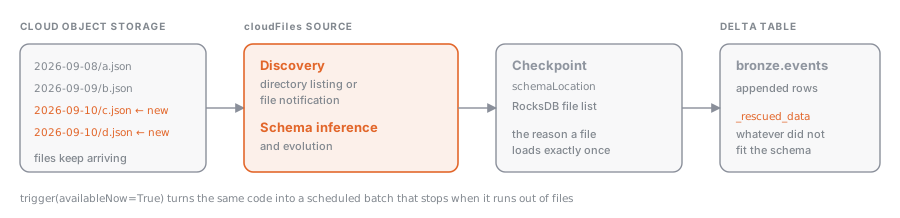
Auto Loader is a Structured Streaming source, identified by the cloudFiles format, that watches a directory in S3, ADLS, GCS, or a Unity Catalog volume and processes files as they arrive. It reads JSON, CSV, XML, Parquet, Avro, ORC, text, and binary files. It keeps the list of already-processed files in a checkpoint (backed by RocksDB), so every file is loaded exactly once, even after a crash or a restart.
Why it exists
Listing a directory with millions of files on every run is slow and expensive, and hand-maintaining a list of files you have already seen is fragile. Auto Loader solves both problems: it discovers new files efficiently and remembers its state in the checkpoint. On top of that, it handles two things that always happen with real-world files: you don’t know the schema up front, and the schema changes over time.
How it works
Reading and writing
(spark.readStream.format("cloudFiles")
  .option("cloudFiles.format", "json")
  .option("cloudFiles.schemaLocation", "<checkpoint path>")
  .load("<source path>")
  .writeStream
  .option("checkpointLocation", "<checkpoint path>")
  .toTable("<catalog>.<schema>.<table>"))
cloudFiles.format tells Auto Loader the file format. cloudFiles.schemaLocation is where it stores the inferred schema (in a _schemas subfolder) and its history; it usually matches the checkpoint location.
File discovery: directory listing or file notification
| Mode | How it finds files | When to use it |
|---|---|---|
| Directory listing (default) | lists the directory, incrementally when file names are lexically ordered | zero setup, moderate volumes |
| File notification | receives events from the storage service (cloudFiles.useNotifications = true, or cloudFiles.useManagedFileEvents = true with file events on a Unity Catalog external location) | millions of files per hour, low latency, lower listing costs |
Unity Catalog-managed file events are the recommended path: a single queue per external location, shared by every stream, with automatic backfill. They require Runtime 14.3 LTS or later.
Schema inference
If you don’t pass a schema, Auto Loader infers one by sampling the first 50 GB or 1000 files (both thresholds are configurable). For JSON, CSV, and XML every column is inferred as string unless you set cloudFiles.inferColumnTypes = true; Parquet and Avro use their embedded schema. With cloudFiles.schemaHints ("data DATE, amount DECIMAL(10,2)") you can fix individual columns without spelling out the whole schema.
Schema evolution
cloudFiles.schemaEvolutionMode decides what happens when a new column shows up:
| Mode | Behavior |
|---|---|
addNewColumns (default without a schema) | updates the schema and stops the stream with UnknownFieldException; on restart it picks up the new columns |
addNewColumnsWithTypeWidening | same as above, and widens compatible types (int → long) |
rescue | never fails: new columns land in _rescued_data |
failOnNewColumns | fails and stays down until you update the schema by hand |
none (default with an explicit schema) | ignores new columns |
The stop in addNewColumns is intentional: that’s why Auto Loader in production runs inside a Lakeflow job with retries, which restarts it automatically.
Schema enforcement and _rescued_data
Auto Loader adds a _rescued_data column (renameable with rescuedDataColumn) where it stores, as JSON, everything that doesn’t fit the schema: unexpected columns, values with the wrong type, casing mismatches. Nothing is lost, and you can inspect the problematic records after the fact.
Incremental batch with availableNow
An always-on stream costs money. With .trigger(availableNow=True) Auto Loader processes every file that arrived before it started and then exits. Scheduled in a job, or kicked off by a file arrival trigger (see Triggers: schedule, file arrival, table update, continuous), it becomes an incremental batch load with streaming guarantees. cloudFiles.maxFilesPerTrigger (default 1000) caps the size of each micro-batch.
Example
Landing JSON events in a bronze table, hourly batch, schema evolution in rescue mode:
checkpoint = "/Volumes/shop/landing/_checkpoints/eventi"

(spark.readStream.format("cloudFiles")
  .option("cloudFiles.format", "json")
  .option("cloudFiles.schemaLocation", checkpoint)
  .option("cloudFiles.inferColumnTypes", "true")
  .option("cloudFiles.schemaEvolutionMode", "rescue")
  .option("cloudFiles.schemaHints", "event_ts TIMESTAMP")
  .load("s3://shop-landing/eventi/")
  .writeStream
  .option("checkpointLocation", checkpoint)
  .trigger(availableNow=True)
  .toTable("shop.bronze.eventi"))
In SQL, inside a declarative pipeline (see Lakeflow pipelines) or in Databricks SQL, the equivalent is a streaming table over read_files with cloudFiles:
CREATE OR REFRESH STREAMING TABLE shop.bronze.eventi
AS SELECT *, _metadata.file_path AS source_file
FROM STREAM read_files(
  's3://shop-landing/eventi/',
  format => 'json',
  inferColumnTypes => true,
  schemaEvolutionMode => 'rescue'
);
Common mistakes
- Changing
checkpointLocation: Auto Loader forgets what it has loaded and reloads everything. - Not understanding why the stream “fails” at the first new column: that’s the
addNewColumnsdefault; you need a job with retries or therescuemode. - Leaving every column as string in a JSON feed because you never set
inferColumnTypes. - Using directory listing with millions of files: cost and latency explode; switch to file notification.
- Never looking at
_rescued_data: malformed records pile up silently.
Exam hints
Rewritten from real exam questions: what gets asked and where people slip.
- The exam checks incremental file ingestion: tracking which files have already been seen while leaving source files in place. The trap is choosing governance, table format, or query tools; the rule is that Auto Loader uses the
cloudFilessource with state to process only newly discovered files. - The exam checks Auto Loader schema evolution: what happens when incoming files contain fields the target schema does not know yet. The trap is choosing a mode that keeps the stream running by evolving or rescuing data. Rule: set
cloudFiles.schemaEvolutionModetofailOnNewColumnswhen review must happen before ingestion continues. - The exam checks that Auto Loader is built as a streaming file source, not as a separate batch scheduler. The trap is treating the progress state as the engine; it tracks what was processed but does not process data. Remember: Auto Loader uses Spark Structured Streaming with
cloudFilesfor incremental file ingestion. - The exam checks that Auto Loader is the Databricks file-ingestion mechanism for incremental arrivals. The trap is treating it as a compute choice or ML feature; remember the rule: use the
cloudFilessource in a streaming read to discover new files and load them into Delta. - The exam checks that Auto Loader is the
cloudFilessource for incremental file ingestion into Delta. The trap is treating it as a general workload type like ML, dashboards, or serverless compute. Remember: Auto Loader is used with Structured Streaming, typically throughreadStream. - The exam checks Auto Loader schema inference for JSON and other text-based file formats. The trap is thinking Auto Loader lacks schema inference; it does infer columns, but defaults them to strings unless you provide hints or enable
cloudFiles.inferColumnTypes. - The exam checks Auto Loader’s default schema inference for semi-structured text files. The trap is thinking Auto Loader cannot infer schemas at all; it can, but for JSON, CSV, and XML it keeps fields as strings unless you enable type inference or provide schema hints. Rule: use
cloudFiles.inferColumnTypesorcloudFiles.schemaHintswhen you need numeric or boolean types.
Check yourself
3 questions on what this page says. Pick an answer, then check it.
Show the answer
D. The schema is updated and the stream stops; on restart it picks up the new column
The default, addNewColumns, updates the schema and deliberately stops the stream with an exception. After a restart the new column is part of the schema, which is why production runs use a job with retries.
Read the section againShow the answer
B. Every column is a string
For JSON, CSV and XML all columns are inferred as strings unless cloudFiles.inferColumnTypes is set to true. Only Parquet and Avro bring a schema of their own.
Read the section againShow the answer
C. It processes the files that arrived before it started and then exits, giving an incremental batch load
availableNow handles everything that arrived before the start and then ends, so a scheduled job gets streaming guarantees without paying for an always-on stream.
Read the section again
Where this sits
- Data Analyst AssociateImporting Data
- Data Engineer AssociateData Ingestion and Loading21% of the exam“Use Auto Loader with schema enforcement and schema evolution in batch modes (for example, directory listing or file notification) to land data into Unity-Catalog-governed tables.”
- Data Engineer ProfessionalDeveloping Code for Data Processing using Python and SQL
- Data Engineer ProfessionalData Ingestion & Acquisition
- Learning pathData EngineeringBuild production pipelines: ingest with Auto Loader, COPY INTO and Lakeflow Connect, trans…
Nothing of that kind here yet. Try the full list.