Lakeflow Jobs, what a job is
kept in this browser
Edit this pageA job is the unit of orchestration in Databricks, a graph of tasks that runs on a compute of your choice, with triggers, parameters, and notifications.
Checked against the Databricks documentation on · history
On this page6
What it is
A job is the object Databricks uses to run work non-interactively: a set of tasks connected by dependencies, executed on a compute you choose, started by a trigger (manual, scheduled, on file arrival, on table update), and observed through runs, notifications, and metrics.
The product is called Lakeflow Jobs. Until 2025 it showed up in the sidebar as Workflows, and plenty of material still uses that name. In the API the term remains jobs.
Why it exists
A notebook you launch by hand is not a production process. There is no answer to “who starts it”, “what happens if it fails”, “which version of the code is running”, or “where do the logs go”. A job answers all of those in one place: a declarative definition (UI, API, CLI, or bundle, see Declarative Automation Bundles and the Databricks CLI), run history, retries, notifications, and permissions.
How it works
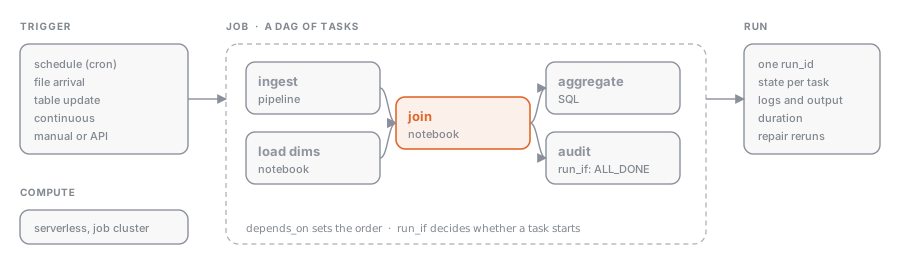 A job has three levels.
Job: name, owner, job parameters (see Job and task parameters, dynamic values, and task values), trigger (see Triggers: schedule, file arrival, table update, continuous), concurrency limits, notifications, tags, and permissions.
Task: the unit of work. Each task has a type, a compute, and optionally dependencies on other tasks. The types you need to recognize:
| Task type | What it runs | When to use it |
|---|---|---|
| Notebook | a notebook from the workspace or a Git folder | transformations, exploration promoted to production |
| Python script / wheel | a .py file or a wheel package | tested code, internal libraries |
| SQL | a saved query, a .sql file, an alert, or a dashboard refresh on a SQL warehouse | pure SQL steps, refreshing BI objects |
| Pipeline | a Lakeflow Spark Declarative Pipeline (see Lakeflow pipelines) | declarative ingestion and transformation |
| Dashboard | a refresh of an AI/BI dashboard | closing the ETL chain with the business-facing output |
| dbt | a dbt project | teams already working with dbt |
| Run job | another job | composing reusable jobs |
| If/else, For each | control flow (see Control flow: retries, if/else, for each, run job) | conditional branches, loops over lists |
Run: a single execution of the job. Every run has a run_id, a state for each task, logs, duration, and output. Run history is the foundation of monitoring (see Monitoring runs: states, run history, trends).
Compute
Each task can run on:
- serverless: the recommended default, no cluster to manage, starts in seconds;
- job cluster: a cluster created for the run and torn down at the end, defined in the job;
- existing all-purpose cluster: not recommended in production, costs more and mixes interactive workloads in.
SQL tasks run on a SQL warehouse instead. Choosing between these is covered in Choosing compute: all-purpose, job cluster, serverless, SQL warehouse.
Example
A typical ETL job has four tasks: ingestion (pipeline), cleaning (notebook), aggregation (SQL), and a dashboard refresh. In a bundle it is declared like this:
resources:
  jobs:
    daily_sales:
      name: daily_sales
      tasks:
        - task_key: ingest
          pipeline_task:
            pipeline_id: ${resources.pipelines.bronze_sales.id}
        - task_key: clean
          depends_on: [{ task_key: ingest }]
          notebook_task:
            notebook_path: ./notebooks/clean_sales.py
        - task_key: aggregate
          depends_on: [{ task_key: clean }]
          sql_task:
            warehouse_id: ${var.warehouse_id}
            file: { path: ./sql/aggregate_sales.sql }
        - task_key: refresh_dashboard
          depends_on: [{ task_key: aggregate }]
          dashboard_task:
            dashboard_id: ${var.dashboard_id}
The same job can be created from code with the SDK:
from databricks.sdk import WorkspaceClient
from databricks.sdk.service import jobs

w = WorkspaceClient()

job = w.jobs.create(
    name="daily_sales",
    tasks=[
        jobs.Task(
            task_key="clean",
            notebook_task=jobs.NotebookTask(notebook_path="/Workspace/etl/clean_sales"),
        ),
        jobs.Task(
            task_key="aggregate",
            depends_on=[jobs.TaskDependency(task_key="clean")],
            sql_task=jobs.SqlTask(
                warehouse_id="<warehouse-id>",
                file=jobs.SqlTaskFile(path="/Workspace/etl/aggregate_sales.sql"),
            ),
        ),
    ],
)
print(job.job_id)
Common mistakes
- Using an all-purpose cluster for a scheduled job: you pay the interactive rate and compete for resources with users.
- Putting all the logic in one giant notebook task: you lose the ability to rerun only the piece that failed (see Repair runs, retries, and notifications).
- Confusing job parameters with task parameters: the former are visible to every task, the latter only to their own task.
- Forgetting failure notifications: the job fails silently and you find out from an empty dashboard.
Where this sits
- Data Engineer AssociateWorking with Lakeflow Jobs16% of the exam“Configure common tasks (notebook, SQL query, dashboard, and pipeline tasks) and their dependencies using Lakeflow Jobs and its DAG-based task graph”
- Data Engineer ProfessionalDeveloping Code for Data Processing using Python and SQL
- Learning pathData EngineeringBuild production pipelines: ingest with Auto Loader, COPY INTO and Lakeflow Connect, trans…
Nothing of that kind here yet. Try the full list.