Unity Catalog, the governance layer
kept in this browser
Edit this pageUnity Catalog is the central metastore of Databricks. Three-level namespace, securable objects, credentials to storage, lineage and audit shared by every workspace in a region.
Checked against the Databricks documentation on · history
On this page10
What it is
Unity Catalog is the governance system of Databricks: a single catalog that knows which tables, volumes, functions, and models exist, where their files live, who can do what, and where the data comes from. It lives at the account level, not the workspace level: every workspace in a region shares the same metastore and therefore the same permissions.
Why it exists
Before Unity Catalog every workspace had its own Hive metastore: two workspaces could not share a table, permissions were configured with local ACLs and local groups, and file access went through cloud credentials mounted on the cluster. Unity Catalog moves everything to the account level and puts the credential in the catalog, not on the compute.
How it works
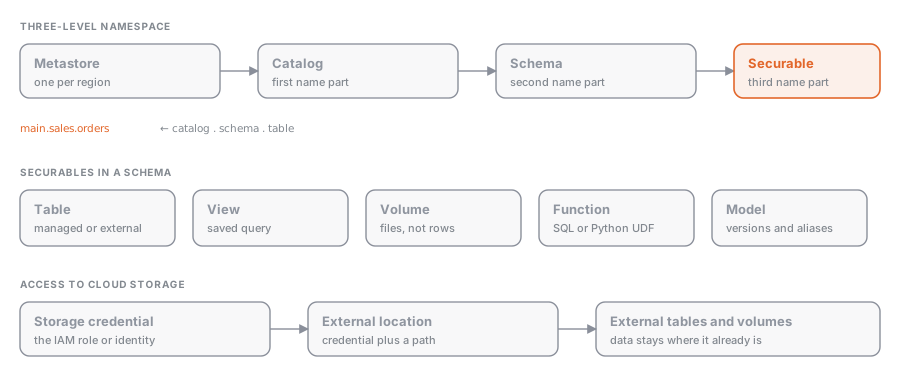
The metastore and the three-level namespace
The metastore is the container for everything. Inside it, data objects are addressed with three names:
catalog.schema.object
main.sales.orders| Level | Typical role |
|---|---|
| Catalog | environment or domain: dev, prod, finance |
| Schema (database) | functional area: bronze, silver, sales |
| Object | table, view, materialized view, streaming table, volume, function, model |
Directly under the metastore, outside the catalog hierarchy, sit the infrastructure objects: storage credentials, external locations, connections (Lakehouse Federation), and shares (OpenSharing, formerly Delta Sharing).
Securable objects
Everything governed is a securable: an object on which you GRANT to a principal (user, group, service principal). Permissions are inherited downward: a SELECT on the catalog applies to every schema and table, present and future. The privilege model is covered in Privileges: GRANT, REVOKE, and DENY; fine-grained controls in Row filters and column masks and ABAC policies in Unity Catalog.
Storage access
Two objects connect the catalog to the cloud:
- Storage credential: a long-lived credential (for example an IAM role) that can read and write a bucket.
- External location: a path in object storage plus the storage credential that authorizes it.
Managed tables write to the managed location defined at the schema level, the catalog level, or, failing that, the metastore level (the most specific level wins). External tables point to a path inside an external location. The difference is explored in Managed and external tables.
Lineage and audit
Unity Catalog automatically records lineage at the table and column level: which notebooks, jobs, pipelines, and dashboards read or write each object. Every access ends up in the audit system tables. There is nothing to configure: you just use catalog objects with compatible compute.
hive_metastore
In workspaces with Unity Catalog, the old metastore appears as a catalog named hive_metastore. Its tables can be queried (hive_metastore.default.vecchia_tabella) but they have no lineage, no audit, and none of the Unity Catalog permission model, and they are not visible from other workspaces.
| Hive metastore | Unity Catalog | |
|---|---|---|
| Scope | one workspace | account, multi-workspace |
| Namespace | schema.table (two levels) | catalog.schema.object |
| Groups | workspace-local | account-level |
| Storage credentials | on the cluster (instance profile, mount) | in the catalog (storage credential) |
| Lineage and audit | no | yes, automatic |
DENY | yes | no, replaced by policies |
Example
Minimal setup of a production catalog with its storage and a first table:
CREATE EXTERNAL LOCATION prod_data
  URL 's3://acme-prod-data/'
  WITH (STORAGE CREDENTIAL acme_prod_role);

CREATE CATALOG prod
  MANAGED LOCATION 's3://acme-prod-data/managed/';

CREATE SCHEMA prod.sales;

CREATE TABLE prod.sales.orders (id BIGINT, amount DECIMAL(10,2), order_date DATE);

GRANT USE CATALOG ON CATALOG prod TO `analysts`;
GRANT USE SCHEMA ON SCHEMA prod.sales TO `analysts`;
GRANT SELECT ON TABLE prod.sales.orders TO `analysts`;spark.sql("CREATE SCHEMA IF NOT EXISTS prod.sales")
df.write.saveAsTable("prod.sales.orders")
spark.sql("GRANT SELECT ON TABLE prod.sales.orders TO `analysts`")Common mistakes
- Omitting the catalog from the table name and landing in the workspace’s default catalog (which may be
hive_metastorein older workspaces). - Granting
SELECTon a table withoutUSE CATALOGandUSE SCHEMAon the levels above: the user cannot see it. - Confusing storage credential and external location: the first is the key, the second is the door the key opens.
- Creating an external location that is too broad (the whole bucket) and then being unable to create more specific ones: paths cannot overlap.
Check yourself
3 questions on what this page says. Pick an answer, then check it.
Show the answer
C. Every schema and table under it, including ones created later
Permissions are inherited downward, so SELECT on a catalog applies to all its schemas and tables, present and future.
Read the section againShow the answer
C. A storage credential can read and write a bucket; an external location is a path plus the credential that authorizes it
The storage credential is the key (for example an IAM role) and the external location is the door it opens: a path in object storage tied to a credential that authorizes access.
Read the section againShow the answer
D. It has no lineage, no audit and none of the Unity Catalog permission model, and other workspaces cannot see it
hive_metastore is the legacy per-workspace metastore shown as a catalog. It can be queried, but it lacks lineage, audit and Unity Catalog permissions, and it is not shared across workspaces.
Read the section again
Where this sits
- Data Analyst AssociateUnderstanding of Databricks Data Intelligence Platform
- Data Analyst AssociateManaging Data
- Data Analyst AssociateSecuring Data
- Data Engineer AssociateDatabricks Intelligence Platform6% of the exam“Understand the core components of the Databricks Data Intelligence Platform, such as its architecture, Delta Lake, and Unity Catalog.”
- Data Engineer ProfessionalData Governance
- Learning pathLakehouse FoundationsHow the Databricks platform is put together: control plane and compute, Delta Lake as the …
- Learning pathGovernance & SecurityUnity Catalog end to end: the three-level namespace, managed and external tables, privileg…
- Learning pathSQL & AnalyticsQuery the lakehouse from the SQL editor, model gold tables and views for BI, and understan…
- Learning pathGenerative AIFoundation models on Databricks, vector search for retrieval, agents built with Agent Bric…
Nothing of that kind here yet. Try the full list.