Upsert with MERGE INTO
kept in this browser
Edit this pageMERGE INTO applies inserts, updates and deletes to a Delta table in one atomic commit. Clause semantics, the single-match rule, deduplicating the source, and schema evolution.
Checked against the Databricks documentation on · history
On this page11
What it is
MERGE INTO applies a batch of changes to a Delta table in a single atomic commit. You give it a target table, a source (a table, a view, a subquery or a DataFrame), a join condition, and then clauses describing what to do with rows that match, rows that exist only in the source, and rows that exist only in the target. The whole statement becomes one entry in the transaction log described in Delta Lake, the lakehouse table format: a concurrent reader sees the table before the merge or after it, never halfway through.
The common shape is an upsert: update the rows whose key already exists, insert the rows whose key does not. Because the statement matches on a key instead of appending blindly, running it twice against the same source leaves the table in the same state. That is what makes it safe inside a job that retries.
MERGE, UPDATE, DELETE on Delta covers MERGE alongside UPDATE, DELETE and REPLACE WHERE as a family. This page is about the merge itself: the clause semantics, the matching rule that breaks statements in production, and the shapes that hold up.
Why it exists
Before MERGE, applying a batch of changes meant a DELETE of the affected keys followed by an INSERT, in two separate commits. Between the two, rows were missing from the table, and anyone querying in that window got a wrong answer. If the job died in between, the table stayed wrong. The safe alternative was to rebuild the table from the full source on every run, which is correct but costs in proportion to the size of the table rather than the size of the change.
MERGE collapses that into one statement and one commit, and gives it the vocabulary for all three cases: matched, new, and missing from the source. That last one is what separates an upsert from a full sync.
How it works
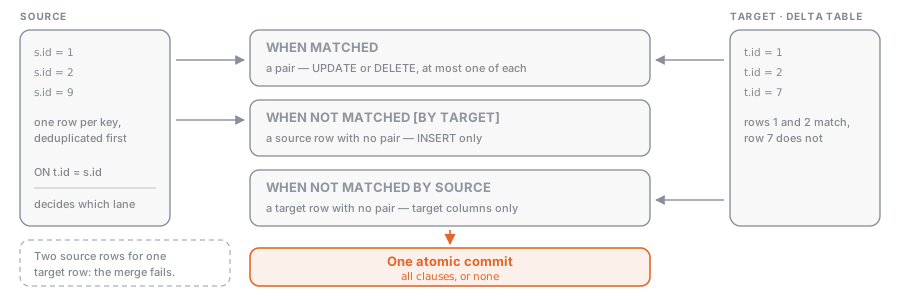
The three clause families
| Clause | Fires when | Actions allowed | Availability |
|---|---|---|---|
WHEN MATCHED | a source row matches a target row | at most one UPDATE and one DELETE per clause | all versions |
WHEN NOT MATCHED [BY TARGET] | a source row matches no target row | INSERT only | BY TARGET alias in Databricks Runtime 12.2 LTS and above |
WHEN NOT MATCHED BY SOURCE | a target row matches no source row | UPDATE or DELETE | Databricks SQL and Databricks Runtime 12.2 LTS and above |
You can write any number of clauses of each kind. They are evaluated in the order written, and every clause except the last of its kind must carry an AND condition; omit it and the statement fails with NON_LAST_MATCHED_CLAUSE_OMIT_CONDITION or the equivalent for the other two families. If no WHEN MATCHED condition is true for a matched pair, the target row is left unchanged.
WHEN NOT MATCHED BY SOURCE has no source row to read from, so its UPDATE may only use literals or expressions over target columns, such as SET t.status = 'inactive' or SET t.miss_count = t.miss_count + 1. It is also the clause that quietly rewrites the entire table when you give it no condition, because every unmatched target row becomes a candidate. Scope it to the window the source actually covers.
One target row, at most one source row
This is the rule that breaks merges in production. If two source rows match the same target row and the merge tries to update it, the statement fails with DELTA_MULTIPLE_SOURCE_ROW_MATCHING_TARGET_ROW_IN_MERGE. There is no defined answer to which of the two should win, so Delta refuses rather than picking one.
In Databricks Runtime 16.0 and above, the conditions on the WHEN MATCHED clauses count towards deciding whether there are multiple matches. In 15.4 LTS and below, only the ON condition is considered, so an AND that would have disambiguated the pair does not save you there.
The single exception is an unconditional WHEN MATCHED THEN DELETE: deleting the same row twice is not ambiguous, so multiple matches are allowed.
Deduplicate before you merge
A change feed almost always carries more than one change per key per batch. Collapse it to one row per key first, keeping the latest by sequence, with the QUALIFY pattern from Window functions:
SELECT * FROM changes
QUALIFY row_number() OVER (PARTITION BY order_id ORDER BY seq DESC) = 1
Be precise about what the merge does for you and what it does not. It deduplicates the incoming data against rows already in the table, but duplicates within the incoming batch are still inserted. That is the catch in the insert-only shape used to deduplicate an append-only log:
MERGE INTO main.bronze.events AS t
USING new_events AS s
ON t.event_id = s.event_id AND t.event_date > current_date() - INTERVAL 7 DAYS
WHEN NOT MATCHED AND s.event_date > current_date() - INTERVAL 7 DAYS THEN INSERT *;
The date predicate on both sides is not cosmetic. Without it, every run scans the whole target looking for matches. Narrowing the match window to the period in which a late duplicate can plausibly arrive is the cheapest optimisation a merge has.
Schema evolution
By default UPDATE SET * and INSERT * assume the source has the same columns as the target; a new column in the source is an analysis error. In Databricks Runtime 15.4 LTS and above, MERGE WITH SCHEMA EVOLUTION in SQL, or .withSchemaEvolution() on the Python builder, adds the missing columns to the target as part of the same commit.
With it enabled, columns present in the source but not the target are added and populated; columns present in the target but not the source are left unchanged by UPDATE SET * and set to NULL by INSERT *. Naming a column explicitly evolves the schema only when that column genuinely exists in the source: UPDATE SET t.newcol = s.newcol evolves, UPDATE SET t.newcol = s.x + s.y does not. EXCEPT (col) on an action excludes a source column from evolution.
The session-wide spark.databricks.delta.schema.autoMerge.enabled does the same for every write in the session. Databricks recommends against it in production, and the reason is worth repeating: with it set, you cannot tell by reading a statement whether that statement can change the table’s schema.
Streaming upserts with foreachBatch
Structured Streaming (see Structured Streaming on Databricks) has no merge sink. The pattern is foreachBatch, which hands you each micro-batch as an ordinary DataFrame so you can run a merge against it. The checkpoint gives you exactly-once delivery of each batch, and the merge makes reprocessing a batch harmless anyway.
When MERGE is the wrong tool
| What you are doing | Better statement |
|---|---|
| Appending rows that are never revised | INSERT INTO, or a plain streaming append |
| Replacing one day or one slice of a table | INSERT INTO ... REPLACE WHERE |
| Turning a CDC feed into an SCD 1 or SCD 2 table in a pipeline | AUTO CDC, see Change data capture with AUTO CDC |
| Rebuilding the table from the full source on every run | CREATE OR REPLACE TABLE |
| Changing one column across most of the table | UPDATE |
A merge that matches every row and updates every column is a full table rewrite with extra join cost. A merge on an append-only bronze table is pure overhead. Reach for MERGE when the change set is genuinely a mix of inserts and updates keyed on something, and keep the cheaper statement otherwise.
Example: applying a change feed from bronze to silver
One row per key, deletes honoured, rows absent from a five-day source window retired rather than dropped.
MERGE INTO main.silver.orders AS t
USING (
  SELECT * FROM main.bronze.orders_cdc
  WHERE op_ts >= current_date() - INTERVAL 5 DAYS
  QUALIFY row_number() OVER (PARTITION BY order_id ORDER BY op_ts DESC) = 1
) AS s
ON t.order_id = s.order_id
WHEN MATCHED AND s.op = 'DELETE' THEN DELETE
WHEN MATCHED AND s.op_ts > t.op_ts THEN UPDATE SET *
WHEN NOT MATCHED AND s.op != 'DELETE' THEN INSERT *
WHEN NOT MATCHED BY SOURCE AND t.op_ts >= current_date() - INTERVAL 5 DAYS
  THEN UPDATE SET t.status = 'retired';
from delta.tables import DeltaTable
def upsert(batch_df, batch_id):
(DeltaTable.forName(batch_df.sparkSession, "main.silver.orders").alias("t")
.merge(batch_df.dropDuplicates(["order_id"]).alias("s"), "t.order_id = s.order_id")
.withSchemaEvolution() # Databricks Runtime 15.4 LTS and above
.whenMatchedDelete(condition="s.op = 'DELETE'")
.whenMatchedUpdateAll(condition="s.op_ts > t.op_ts")
.whenNotMatchedInsertAll(condition="s.op != 'DELETE'")
.execute())
(spark.readStream
.option("readChangeFeed", "true")
.table("main.bronze.orders")
.writeStream
.foreachBatch(upsert)
.option("checkpointLocation", "/Volumes/main/silver/_checkpoints/orders")
.trigger(availableNow=True)
.start())dropDuplicates(["order_id"]) here is a placeholder for whatever “latest wins” means in your feed; if ordering matters, sort with a window before the merge as in the SQL version. Reading the change feed as a stream is covered in Change Data Feed.
Common mistakes
- Merging a source with duplicate keys. The statement fails with
DELTA_MULTIPLE_SOURCE_ROW_MATCHING_TARGET_ROW_IN_MERGE, usually at 3am on the one night the upstream system double-published. Deduplicate in theUSINGsubquery, not in theONcondition. - An unconditional
WHEN NOT MATCHED BY SOURCE THEN DELETEagainst a partial source. Yesterday’s incremental extract is not the whole table, so every row it does not mention gets deleted. Only use it unconditionally when the source really is the full desired state. - No predicate narrowing the match.
ON t.id = s.idalone makes every run a full scan of the target. Add a date or partition predicate on both sides when the change window is known. - Assuming the merge deduplicates the incoming batch. It deduplicates against the table, not within the batch. Duplicate keys in a single batch are inserted as duplicates by an insert-only merge.
- Turning on
spark.databricks.delta.schema.autoMerge.enabledand forgetting. A typo in a column name then silently adds a column instead of failing. UseMERGE WITH SCHEMA EVOLUTIONper statement. - Merging into a table with large files and no clustering. Every touched file is rewritten in full, so a hundred-row change can rewrite gigabytes. Cluster on the merge key, see Liquid clustering.
Exam hints
Rewritten from real exam questions: what gets asked and where people slip.
- This checks upsert logic in Delta Lake: changing existing rows and adding new ones in one operation. The trap is choosing a simple load command; it writes rows without comparing them to the target. Remember: use
MERGE INTOwith a match condition, and deduplicate the source when one target row could match more than once. - The exam checks when an upsert is needed, not just an append. The trap is treating MERGE INTO as a storage or table-type feature; it is about matching source rows to existing target rows. Remember: use
MERGE INTOwhen keys drive update/insert/delete logic;INSERT INTOonly adds rows. - The exam checks that MERGE INTO is Delta Lake’s upsert pattern: match incoming rows to target rows, then update existing records or insert only new ones. The trap is choosing a load command that simply adds rows; remember to define the match condition and deduplicate the source if one target row could match more than once.
Where this sits
- Data Engineer AssociateData Transformation and Modeling22% of the exam“Apply changes from bronze into silver Delta tables with MERGE INTO, deduplicating the source and choosing the right clause for inserts, updates and deletes.”
- Learning pathData EngineeringBuild production pipelines: ingest with Auto Loader, COPY INTO and Lakeflow Connect, trans…
Nothing of that kind here yet. Try the full list.