Sharing data with OpenSharing
kept in this browser
Edit this pageHow a share, a provider and a recipient actually work: the two sharing protocols, bearer tokens against OIDC federation, sharing with history, and what cannot be shared.
Checked against the Databricks documentation on · revised · history
On the end-of-support timeline: Old-format OpenSharing recipient tokens · 8 Dec 2026
On this page12
What it is
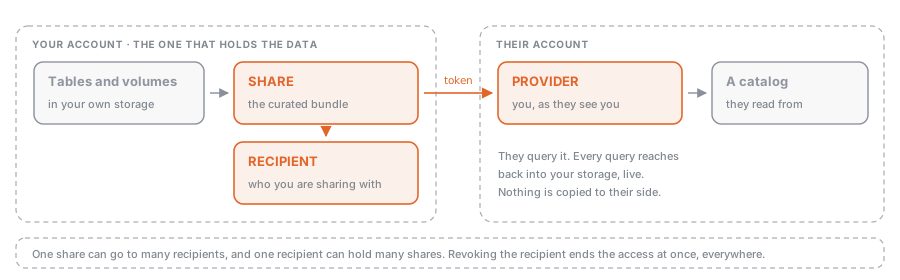
OpenSharing is the protocol and the set of Unity Catalog objects that let you give an outside organisation live read access to data you hold, without sending them a copy. Three securables carry the whole model: a share is the curated bundle of assets, a recipient is the organisation you are sharing with, and a provider is what the recipient sees on their side representing you.
Marketplace and Clean Rooms is the map: what sharing is for, how Marketplace and Clean Rooms sit on top of it, and how the two sharing models differ in one table. This page is the terrain: the objects you create, the credentials that hold the connection together, the options that decide whether a recipient can time travel or stream, and the list of things that cannot be shared at all.
Why it exists
The default way data leaves an organisation is a copy: a nightly extract, an S3 bucket someone was granted access to, a file dropped on SFTP. Every copy is stale from the moment it is written, has to be regenerated on a schedule nobody owns, and cannot be taken back. Revoking access to an extract someone already downloaded is not a thing you can do.
OpenSharing inverts that. The provider registers what may be read; the recipient reads the actual files through short-lived, path-scoped credentials issued at query time. Nothing is duplicated, updates show up in near real time, access is revocable on demand, and every access lands in the provider’s audit log alongside ordinary Unity Catalog activity. Because the protocol is open and has connectors for Spark, pandas, Power BI and others, the recipient does not have to be a Databricks customer for any of that to hold.
How it works
The three objects and their lifecycle
| Object | Lives in | Created by | Deleting it |
|---|---|---|---|
| Share | the provider’s metastore | provider, with the CREATE SHARE privilege | every recipient loses access to it |
| Recipient | the provider’s metastore | provider, with the CREATE RECIPIENT privilege | that organisation loses every share |
| Provider | the recipient’s metastore | created for them when the share is granted | the recipient loses that provider’s shares |
A share holds assets from exactly one metastore, so an organisation sharing from three metastores has to define the recipient three times, once per metastore. Assets can be added and removed at any time, and grants revoked at any time.
One sharp edge: deleting a parent object cascades to its children even if those children sit in an active share, and after a cascade delete you cannot re-add an asset with the same name to that share. Remove assets from shares before dropping the catalog or schema that holds them.
What can go in a share
Tables and table partitions, streaming tables, managed Iceberg tables, foreign tables and schemas, views including dynamic views, materialized views, metric views, volumes, Python UDFs, notebooks, AI models, Genie Agents and FeatureSpecs. Sharing a whole schema shares everything in it, including assets added later.
But only the Databricks-to-Databricks path carries the non-tabular half. Notebooks, volumes, models and metric views are D2D-only; an open recipient gets tables and views.
What you cannot share at all: tables with row filters or column masks (see Row filters and column masks), tables with collations enabled, SHALLOW CLONE tables, tables using liquid clustering with partition filtering, and R2 tables with V2 checkpoint. Foreign key constraints do not survive into a shared table. Tabular data has to be Delta or managed Iceberg.
Two protocols, three ways to authenticate
| Databricks-to-Databricks (D2D) | Open sharing, bearer token | Open sharing, OIDC federation | |
|---|---|---|---|
| Recipient needs | a Unity Catalog-enabled workspace | any Delta Sharing client | an identity provider |
| Credential | an email invitation (Beta), or the recipient metastore’s sharing identifier; no bearer token at all | a long-lived bearer token you send via an activation link | short-lived Databricks OAuth tokens exchanged for the recipient’s JWTs |
| Provider manages | nothing | token lifetime, rotation, revocation | the federation config |
| Assets | everything, including notebooks, volumes, models | tables and views | tables and views |
Databricks-to-Databricks no longer starts with asking the recipient for their sharing identifier: the provider can invite them by email, or use the identifier of their metastore. In SQL, CREATE RECIPIENT decides which kind you get: with USING ID '<sharing-identifier>' the recipient’s authentication_type is DATABRICKS, without it the type is TOKEN and Databricks hands you an activation link to pass to them over a secure channel. OIDC federation is the option to reach for when a long-lived bearer token is not acceptable to your security team and the recipient is not on Databricks.
OpenSharing by email is now a Beta delivery path layered on top of recipient creation, not a fourth protocol and not a new authentication type. Instead of collecting a Databricks recipient’s sharing identifier first, or manually handing an open recipient a credential file, the provider can create the recipient with an email address and let OpenSharing send the activation link when access is granted. The invitation can allow Databricks, open sharing, or either one; it does not support OIDC federation.
Sharing with history
WITH HISTORY on a table share is the option people miss, and it decides more than its name suggests. Sharing history lets the recipient run time travel queries, read the table as a Structured Streaming source, and run transactions. On Databricks-to-Databricks shares it also shares the Delta log, which is what allows cloud tokens (temporary credentials scoped to the table’s root directory) and therefore performance comparable to reading the source table directly.
It requires Databricks Runtime 12.2 LTS or above, and is the default when the compute creating the share runs Databricks Runtime 16.2 or above; on earlier runtimes the default is WITHOUT HISTORY. Schema shares are WITH HISTORY by default regardless. If you also want the recipient to call table_changes() on the share, enable Change Data Feed on the table before you share it with history.
Note what history sharing exposes: credentials scoped to the table root grant read access to the Delta log too, which carries the commit history, who committed, and deleted data that has not been vacuumed yet.
Narrowing what a recipient sees
Three mechanisms, in increasing order of subtlety:
- a partition specification on
ALTER SHARE ... ADD TABLE, so only some partitions are exposed; - recipient properties, set on the recipient and read back with
CURRENT_RECIPIENT().<key>in the partition clause, so one share serves several recipients and each sees their own slice; - dynamic views, which filter rows and mask columns based on recipient properties. Views are the only route here, because row filters and column masks on the table itself make it unshareable.
A partition filter, however, disqualifies a table from cloud-token access, so the slice is materialised and filtered on the provider’s side instead.
What it costs
Sharing inside a region incurs no egress cost, because nothing is replicated. Across regions or clouds, the cloud vendor charges its usual egress, unless the provider uses SecureConnect, in which case Databricks bills the transfer. Compute is charged to whoever runs it: a recipient on serverless, or on classic compute in the same account, reads the underlying data directly and pays for it; a recipient on classic compute in a different account, or any open-sharing connector, causes the provider to do the filtering on the provider’s serverless SKU.
Where the rename leaves you
The capability is called OpenSharing in the docs and the product UI; the open-source protocol and the table format are still Delta Sharing and Delta. Exam guides, including the current Data Engineer Professional guide, still say “delta sharing” and “Delta Share”. They are the same thing. The abbreviations D2D and D2O appear in exam material and mean Databricks-to-Databricks and Databricks-to-Open.
Example: one share, two recipients, one slice each
CREATE SHARE regional_sales
  COMMENT 'Order lines, partitioned per partner country';

-- share with history so the recipient can time travel and stream
ALTER SHARE regional_sales
  ADD TABLE main.gold.order_lines
  PARTITION (country = CURRENT_RECIPIENT().country)
  AS gold.order_lines
  WITH HISTORY;

-- a Databricks recipient: no token, identified by their metastore sharing id
CREATE RECIPIENT acme
  USING ID 'aws:eu-west-1:f12dcb34-5678-9d4c-1234-c5ac67f8b90a'
  PROPERTIES (country = 'IT');

-- a non-Databricks recipient: Databricks issues an activation link and a token
CREATE RECIPIENT partner_bi
  PROPERTIES (country = 'ES');

GRANT SELECT ON SHARE regional_sales TO RECIPIENT acme;
GRANT SELECT ON SHARE regional_sales TO RECIPIENT partner_bi;

DESCRIBE RECIPIENT partner_bi;   -- authentication_type TOKEN, activation_link, token expiry
Both recipients query a table called gold.order_lines and each sees only their own country. Adding a third partner is two statements, not a new pipeline. For the non-Databricks recipient, OpenSharing by email can move the activation-link hand-off into the recipient invite, but the recipient is still using the open-sharing bearer-token path.
Common mistakes
- Sharing a table without
WITH HISTORYand then being asked for time travel or a streaming read. Neither works, and on older runtimesWITHOUT HISTORYis the silent default. Fixing it means altering the share. - Putting a row filter or column mask on a table you intend to share. The table becomes unshareable. Filter with a dynamic view and recipient properties instead.
- Dropping the catalog or schema behind a share. The cascade delete goes through the share, and the asset name is then burned for that share.
- Treating the bearer token as a low-risk credential because it is read-only. It is long-lived by default. Set a lifetime, apply IP access lists, and prefer OIDC federation or D2D where you can.
- Treating OpenSharing by email as an OIDC shortcut. Email invitations can cover Databricks, open sharing, or both, but OIDC federation is not part of that delivery method.
- Assuming an open recipient can receive volumes, models or notebooks. That half of the asset list exists only on the Databricks-to-Databricks path.
- Sharing across regions without checking the bill. No replication means no egress within a region, but a cross-region share moves bytes and someone pays for them.
Where this sits
- Data Engineer ProfessionalData Sharing and Federation“Demonstrate delta sharing securely between Databricks deployments using Databricks-to-Databricks Sharing (D2D) or to external platforms using the open sharing protocol (D2O).”
- Learning pathGovernance & SecurityUnity Catalog end to end: the three-level namespace, managed and external tables, privileg…
Nothing of that kind here yet. Try the full list.