Three Ways to Run AI Functions in Production, and What Each One Costs You
Task-specific functions, ai_query, and a new Lakeflow Jobs task handle the same unstructured data differently — and bill, fail, and budget differently too.

A nightly job somewhere is already reading something unstructured — claim forms, support tickets, scanned contracts — and turning it into typed columns a downstream table can join against. The team that owns it did not set out to build a generative AI pipeline; they needed three new columns and a document nobody wanted to open by hand. Databricks now gives that team three different places to put the model call: inline in a SQL statement, through the general-purpose ai_query, or as a dedicated task in a Lakeflow Job that needs no SQL at all. They are not interchangeable, and what it costs to pick the wrong one is not obvious until the first invoice or the first page at 2 a.m.
Same family, three different places to call it
Task-specific functions — ai_parse_document, ai_extract, ai_classify — are the ones to reach for first. There is no prompt to write: you give ai_classify a list of labels and it gives you labels back, and ai_extract fills a schema you define. All three are generally available, but their interface has versions, and the versions are not cosmetic: version 1 returns a plain STRING while version 2 and later return a VARIANT carrying response, metadata, and error_message. The concept page on AI functions in SQL is blunt about the fix — pin the version explicitly, every time, or a model update quietly changes your column type.
WITH parsed AS (
  SELECT claim_id, ai_parse_document(doc, map('version', '2.0')) AS layout
  FROM READ_FILES('/Volumes/main/raw/claims/', format => 'binaryFile')
)
SELECT
  claim_id,
  ai_extract(
    layout,
    '{"policy_number": {"type": "string"},
      "incident_date": {"type": "string", "description": "YYYY-MM-DD"},
      "claimed_amount": {"type": "number"}}',
    options => map('version', '2.1')
  ) AS fields,
  ai_classify(
    layout,
    '["auto", "property", "liability", "needs_review"]',
    map('version', '2.1', 'enableConfidenceScores', 'true')
  ) AS category
FROM parsed;
ai_query is the fallback for everything that isn’t one of those three jobs. You write the prompt, choose the model, and declare the return type yourself, which is exactly what you want when the task is a rubric nobody has turned into a product feature — scoring the severity of a claim from 1 to 10, say, rather than sorting it into a fixed label set. The concept page on batch inference with ai_query centers on one argument worth remembering by name: failOnError, which decides whether one malformed row ends a million-row run.
CREATE OR REPLACE TABLE main.gold.claim_severity AS
SELECT
  claim_id,
  ai_query(
    'system.ai.gpt-oss-120b',
    concat('Score the severity of this insurance claim from 1 (minor) to 10 (total loss). Return only the number.\n\n', claim_text),
    returnType => 'INT',
    modelParameters => named_struct('temperature', 0.0),
    failOnError => false
  ) AS severity
FROM main.silver.claims
WHERE received_at >= current_date() - INTERVAL 1 DAY;
The third option is new. Databricks’ November 2026 release notes describe an AI Function task, in Beta since November 4: a task type you add directly to a Lakeflow Job to run ai_parse_document, ai_extract, or ai_classify over the files in a volume or the rows of a table, with no SQL to write. The distinguishing feature isn’t the lack of SQL — it’s that each run processes only the inputs that are new or changed since the previous run, and writes the results to a Unity Catalog table that later tasks in the job can read. That incremental filter is exactly the thing a hand-written SQL pipeline has to build itself, usually as an anti-join against a watermark column, and it is now the platform’s problem instead of yours.
Picking the one that fits the job
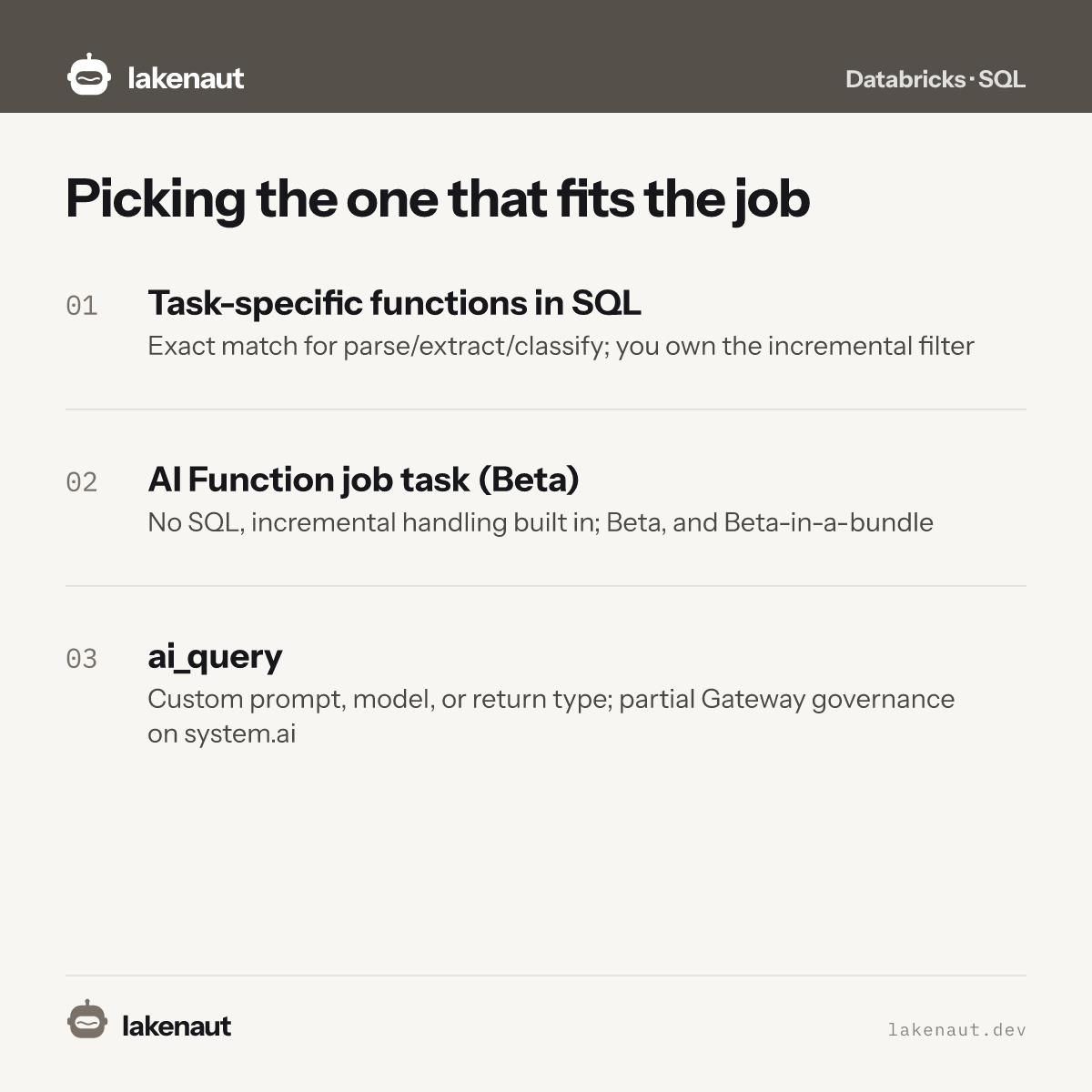
Start with task-specific functions in SQL when the job is exactly parsing, extraction, or classification, a pipeline or notebook already owns the target table, and your team is comfortable writing the incremental filter by hand. You get the most control over scheduling and retries, at the cost of maintaining that filter yourself.
Move to the AI Function job task when the team that should own this transformation doesn’t want to hand-write a SQL pipeline for it, or when “process only what changed” is worth not reinventing. The trade is that you’re adopting a Beta surface, and as of the same release notes, support for the AI Function task in Databricks Asset Bundles only reached Beta on November 13 — a week after the task itself. If you want this under version control the way the rest of your jobs are, you are currently stacking two Betas, not one.
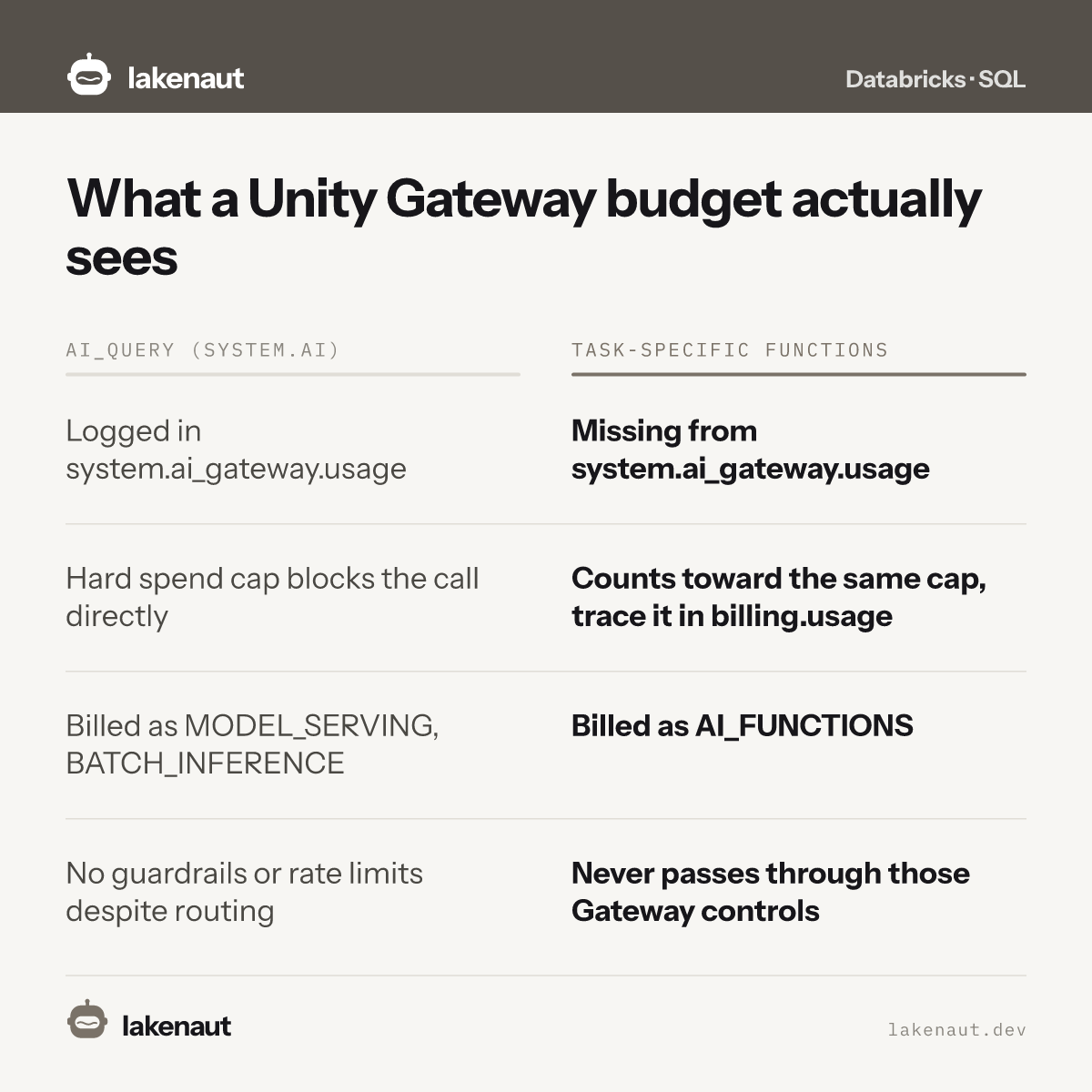
Reach for ai_query only when the task genuinely isn’t one of the three — a custom rubric, a fine-tuned or external model, or an output shape a task-specific function can’t express. There’s a governance wrinkle worth knowing before you lean on it: ai_query calls to a system.ai model service are automatically routed through Unity Gateway, and a documented subset of Gateway features applies to them — usage tracking, budget integration including hard spend caps, and permission checks, but not guardrails, rate limits, fallbacks, or tracing tables.
What goes wrong in production
The version drift described above is the first failure mode, and it is the quiet one: a cast on fields:response.claimed_amount.value::DECIMAL(12,2) simply stops working the day a default version changes under you, with no error until that line runs.
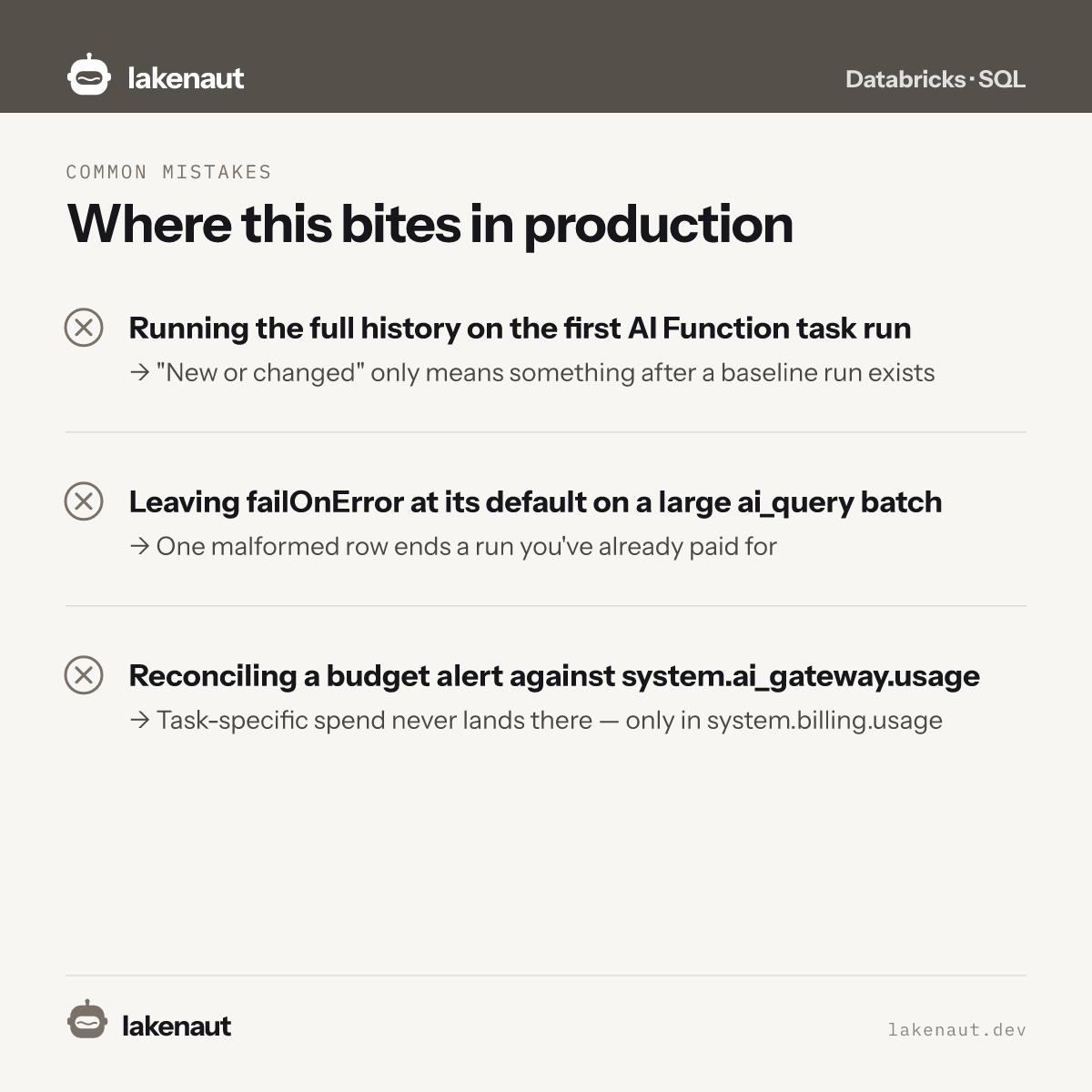
The second is failOnError left at its default on ai_query. The fix is one named argument, but only if someone remembers it exists before the batch that dies at hour five.
The third is cost visibility, and it catches people who did everything else right. Task-specific functions such as ai_parse_document, ai_extract, and ai_classify are billed under the AI_FUNCTIONS product in system.billing.usage. The simpler one-line transforms — ai_summarize, ai_translate, ai_mask, ai_analyze_sentiment, ai_fix_grammar — and ai_query against a Databricks-hosted model both land under MODEL_SERVING with the BATCH_INFERENCE offering type instead. A cost query written for one silently misses the other:
SELECT
  DATE_TRUNC('MONTH', u.usage_date)::DATE AS usage_month,
  COALESCE(u.identity_metadata.run_as, u.identity_metadata.run_by, 'UNATTRIBUTED') AS principal,
  u.billing_origin_product AS product,
  ROUND(SUM(u.usage_quantity * p.pricing.effective_list.default), 2) AS list_cost_usd
FROM system.billing.usage u
JOIN system.billing.list_prices p
  ON u.cloud = p.cloud AND u.sku_name = p.sku_name AND u.usage_unit = p.usage_unit
  AND u.usage_end_time >= p.price_start_time
  AND (p.price_end_time IS NULL OR u.usage_end_time < p.price_end_time)
WHERE p.currency_code = 'USD'
  AND u.usage_date >= current_date() - INTERVAL 30 DAYS
  AND (
    (u.billing_origin_product = 'MODEL_SERVING' AND u.product_features.model_serving.offering_type = 'BATCH_INFERENCE')
    OR u.billing_origin_product = 'AI_FUNCTIONS'
  )
GROUP BY 1, 2, 3
ORDER BY 1 DESC, 4 DESC;
The fourth is the one a Unity Gateway budget will not save you from. As of November 1, 2026, spend from task-specific AI Functions counts toward a Unity Gateway budget’s thresholds — so the block-usage action still fires. But the documentation is explicit that these requests “aren’t recorded in the system.ai_gateway.usage table,” which is the near-real-time view most people reach for first when a budget alert lands. The number you can trust is system.billing.usage, the same table the cost query above reads, and it updates on the order of hours, not the “within moments” that Gateway-scoped enforcement itself runs on. A budget that blocks a user is not the same thing as a dashboard that tells you who was about to get blocked.
Operating it: what to watch
For ai_query, the SQL editor’s query profile — on Databricks Runtime 16.1 ML and above — shows completed and failed inference counts for a running query, which is the fastest way to see a batch degrading before it finishes rather than after. For the AI Function job task, the only place to see what a run actually did is the Unity Catalog output table it writes to and the run’s own history in the job; there’s no separate dashboard for it yet.
For cost, treat tags and budgets as inputs and system.billing.usage as the record, exactly as you would for any other compute. The twist with AI Functions is that the record splits across two billing products instead of one, so the query that answers “what did this cost” has to union them, as above. If any of this spend needs to show up tagged by cost centre, remember the same rule applies here as everywhere else on the platform: an untagged serverless job or warehouse produces untagged usage, AI Functions included, and a budget scoped to a tag nobody applies will report zero and look like good news.
Put a Unity Gateway budget around whichever path is actually new for your workspace this quarter, with alert emails going to the team that owns the job, not just the account admin. For anything routed through Unity Gateway — ai_query against system.ai, pay-per-token calls — the near-real-time block is a real backstop. For task-specific functions called directly in SQL or through the new job task, the budget still totals the spend, but your early-warning system is the billing query, run on a schedule, not a dashboard you check when something feels expensive.
Monday
Write the single query above — the one that unions AI_FUNCTIONS and MODEL_SERVING/BATCH_INFERENCE by principal — and schedule it, even if nobody has asked for it yet; it’s the thing you’ll want the first time finance asks what generative AI is costing.
Audit every ai_classify and ai_extract call already in production for an explicit version argument. An unpinned call is a column type change waiting for a release you didn’t make.
Before adopting the AI Function job task for anything that matters, budget for the first run processing your entire backlog once — “new or changed since the previous run” only has meaning after a baseline exists — and decide now whether you’re comfortable running a Beta task, or a Beta-inside-a-Beta if you also want it in a bundle, on a schedule that pages someone.
The concepts this stands on
Pages read for it
Get the changes that matter by email