Files API 3.0 Fixes the 5 GB Upload Limit, and Hands You a New Network Problem
Multipart upload and conditional writes are the headline. The regional hostname and the late precondition check bite first.

A nightly job drops a multi-gigabyte artifact into a Unity Catalog volume — a model checkpoint, a bulk export, a vendor dump too large to land as rows in a table. Someone wired it up against the Files API because it’s the simplest way to move raw bytes by path, and for months it worked, right up until a file crossed the ceiling and the upload came back with an error nobody had budgeted time to read. The documented fix is Files API 3.0, with multipart upload and the conditional headers anyone who has worked against object storage eventually needs. The part worth planning for isn’t the new verbs. It’s the host you now have to talk to, and a handful of places where the new contract behaves differently from the old one in ways that only surface once something is already running unattended.
What the version number actually changes
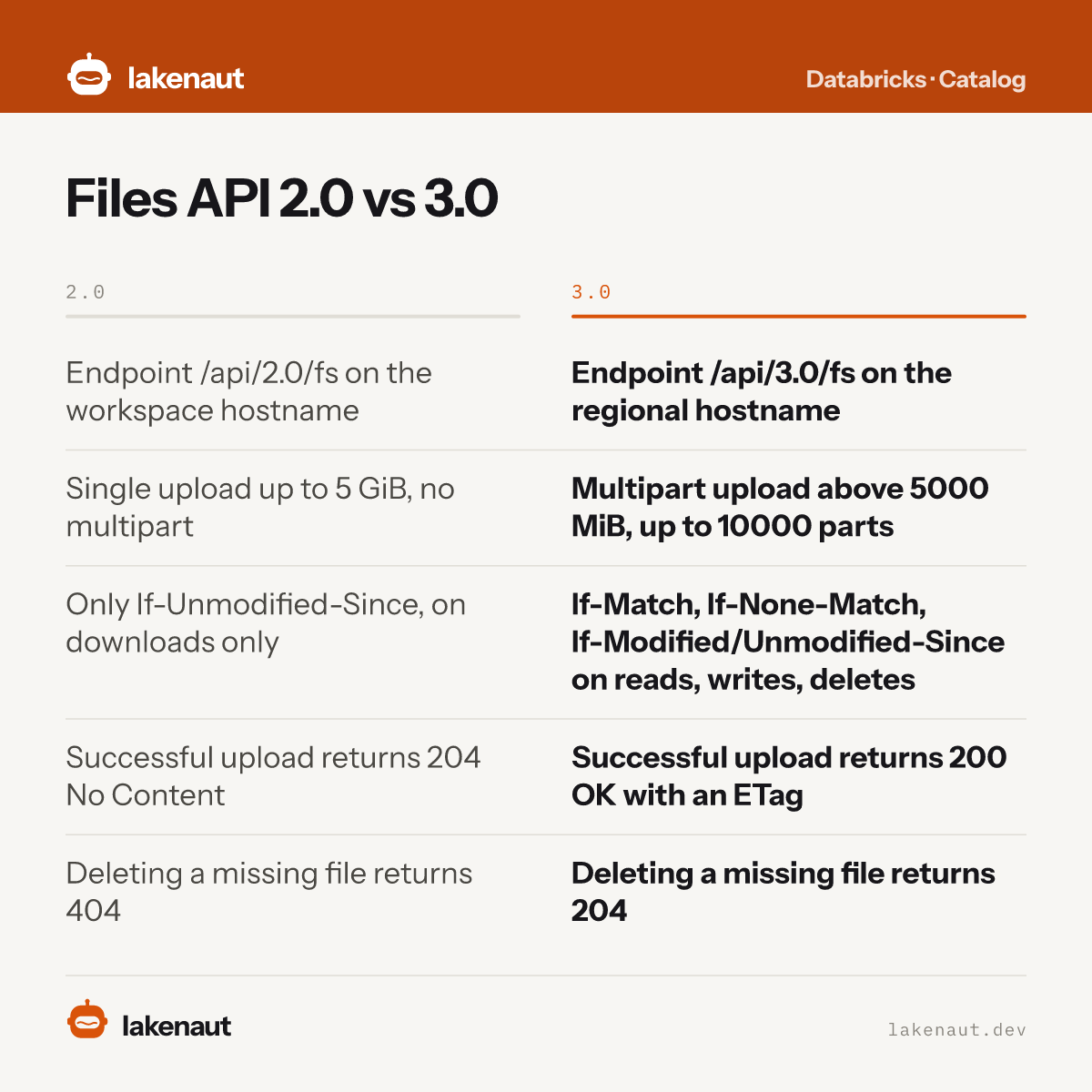
Files API 2.0 is what most Databricks code already calls: requests go to the workspace’s normal hostname, under /api/2.0/fs, and a single PUT accepts a file up to 5 GiB in one shot. There is no multipart path, and the only conditional header the API honors at all is If-Unmodified-Since, on downloads only. A successful upload returns 204 No Content, and deleting a file that doesn’t exist returns 404.
Files API 3.0 keeps the same idea — read, write, list, and delete files and directories in a Unity Catalog volume by their /Volumes/<catalog>/<schema>/<volume>/<path> path — but changes enough of the mechanics that it isn’t a drop-in version bump. Requests go to /api/3.0/fs, they go to a regional hostname rather than the workspace hostname, a single upload still caps at 5000 MiB but anything larger goes through multipart, the full set of RFC 9110 conditional headers applies to reads, writes, and deletes, and a successful upload now returns 200 OK with an ETag header instead of 204. The Files API 3.0 how-to is explicit that this is still Beta: a workspace admin has to turn on “Files API V3 with Large File Upload Support” from the Previews page before any of it works. Databricks’ own what’s-coming notes say 3.0 “will soon be generally available,” with no date attached, and that it becomes the default for compliance-security-profile workspaces starting in December 2026. Beta is not GA, and nothing in either source lets you treat it as settled yet.
Multipart upload, step by step
The REST surface for multipart is three actions on the same POST /api/3.0/fs/files{file_path} endpoint, plus the ordinary PUT. You start a session with action=initiate-upload, which hands back an upload_id. Each part goes up as its own PUT carrying that upload_id and a part_number from 1 to 10000; every part except the last has to be at least 5 MiB, and no part can exceed 4000 MiB. Each part’s response carries an ETag for that part, which you collect and send back, in order, in the body of action=complete-upload. The Files API 3.0 reference is specific that parts are assembled in ascending part_number order regardless of the order they arrived in, and that the ETag returned by complete-upload belongs to the whole assembled file, not to any one part — that’s the value you keep for later conditional requests, not any part’s ETag. A session you decide not to finish gets cancelled with action=abort-upload, which leaves the target path untouched.
A Python client against this looks like ordinary chunked upload code, with Databricks’ three-level volume path standing in for a bucket key and the hostname swapped for the workspace’s regional one:
import requests

host = "1234567890123456.storage.us-west-2.cloud.databricks.com"
path = "/Volumes/main/landing/vendor_a/exports/nightly.parquet"
base = f"https://{host}/api/3.0/fs/files{path}"
headers = {"Authorization": f"Bearer {token}"}

start = requests.post(base, params={"action": "initiate-upload"}, headers=headers)
upload_id = start.json()["upload_id"]

parts = []
for part_number, chunk in enumerate(read_in_chunks(local_file, 256 * 1024 * 1024), start=1):
    resp = requests.put(
        base,
        params={"upload_id": upload_id, "part_number": part_number},
        headers={**headers, "Content-Length": str(len(chunk))},
        data=chunk,
    )
    parts.append({"part_number": part_number, "etag": resp.headers["ETag"]})

complete = requests.post(
    base,
    params={"action": "complete-upload", "upload_id": upload_id},
    headers={**headers, "If-Match": known_etag},
    json={"parts": parts},
)
Two details from the reference matter more than the happy path: Content-Length is a required header on every upload call in 3.0, single-request or multipart part, where 2.0 left it implicit; and the ETag values have to be stored and replayed exactly as the server sent them, quotes included, since the API treats them as opaque strings rather than something you parse.
Conditional requests protect less than they look like they do
The point of a conditional request is to act only if the file is in the state you expect. 3.0 supports If-Match and If-None-Match against the file’s ETag, and If-Modified-Since / If-Unmodified-Since against its Last-Modified time, on reads; writes and deletes only honor If-Match and If-None-Match. If-None-Match: * on a PUT creates a file only if nothing exists at that path; If-Match: <etag> overwrites only if the current ETag still matches what you last read, which is the standard way to avoid the lost-update problem when two processes might touch the same path. A conditional DELETE with If-Match: <etag> removes the file only if it’s still the version you expect, and returns 412 Precondition Failed if someone changed it first, or 404 if it’s already gone.
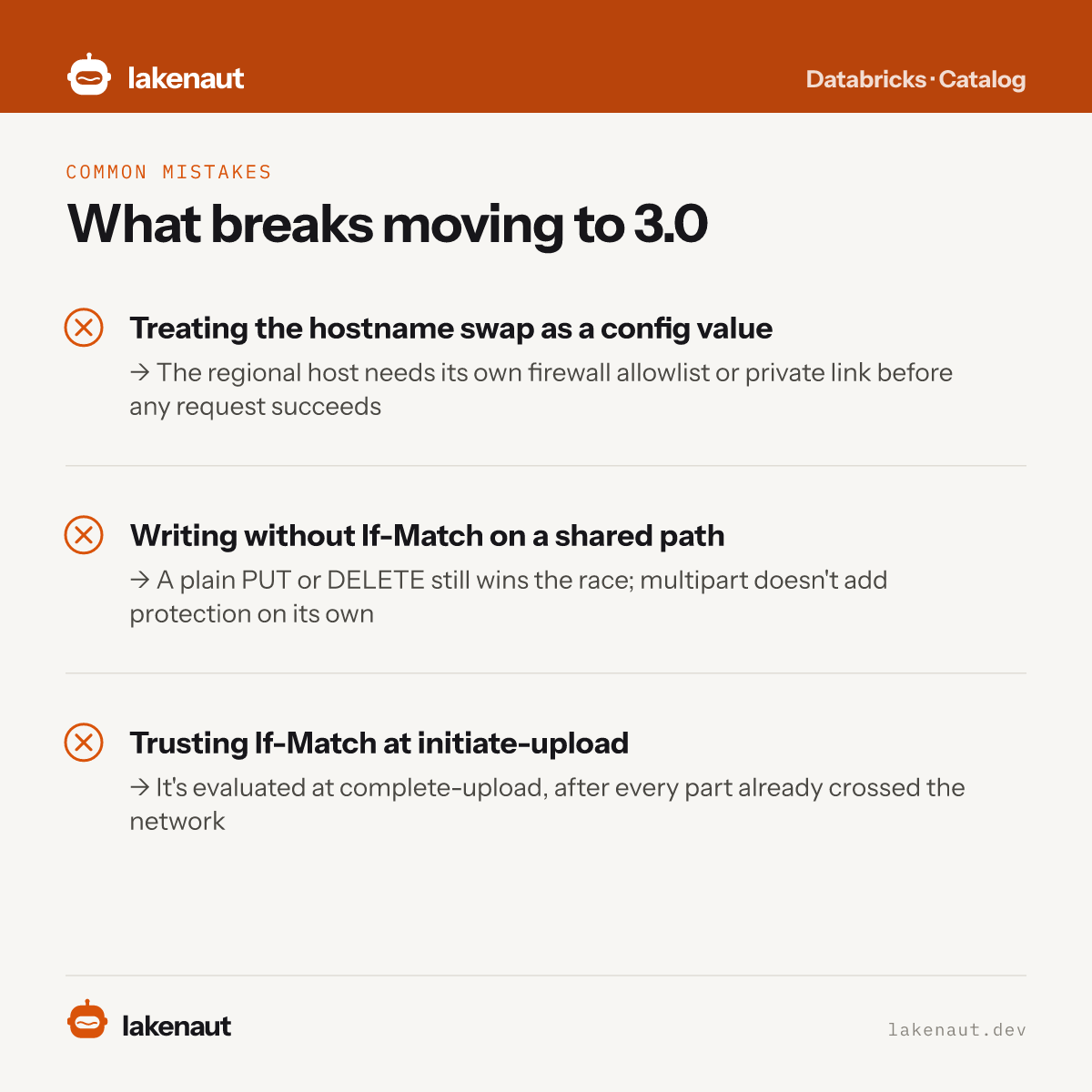
Two limits are easy to miss reading quickly. First, the write path doesn’t support the full RFC 9110 vocabulary — If-Match only takes a single <etag>, and If-None-Match on a write only takes the wildcard *; there’s no “match any of these versions” form on uploads or deletes the way there is on reads. Second, and more consequential for multipart: the conditional header for a multipart upload is sent on initiate-upload, but the how-to page states plainly that it’s evaluated when the upload completes, against the assembled file. That means If-Match or If-None-Match can fail at complete-upload, after every part has already crossed the network — there’s no early exit if the file changes mid-session. For a large file split across dozens of parts, that’s bandwidth spent for nothing if another writer got there first.
What goes wrong in production
The failure that shows up first in most rollouts isn’t a conditional-header bug at all — it’s that the regional hostname is a different network path than the one already allowed through. The how-to page spells out what moving to it requires: if the workspace restricts outbound access with a firewall, the control-plane IP ranges for the region have to be allowlisted; if it connects through a front-end private link instead, a second private link for performance-intensive services has to exist before the first 3.0 request succeeds. None of that shows up by reading the API reference alone, and none of it is optional — a workload that worked against the workspace hostname under 2.0 can fail outright under 3.0 until someone outside the data team opens that path.
The second failure is quieter: automation that checked for 204 No Content on a successful upload, or 404 on deleting a file that was already gone, now sees 200 OK with a body, or 204 on that same delete, because 3.0’s status codes differ from 2.0’s on both of those operations. Code that branches on status code without reading the migration notes will misclassify a success as a failure, or the reverse.
The third is the one worth repeating to anyone reaching for multipart specifically because files got larger: a concurrent writer still wins a race if nobody sends If-Match, exactly as it would under 2.0 — multipart doesn’t add contention, it just makes the cost of losing that race, after already uploading every part, higher than a single PUT ever was.
Operating it
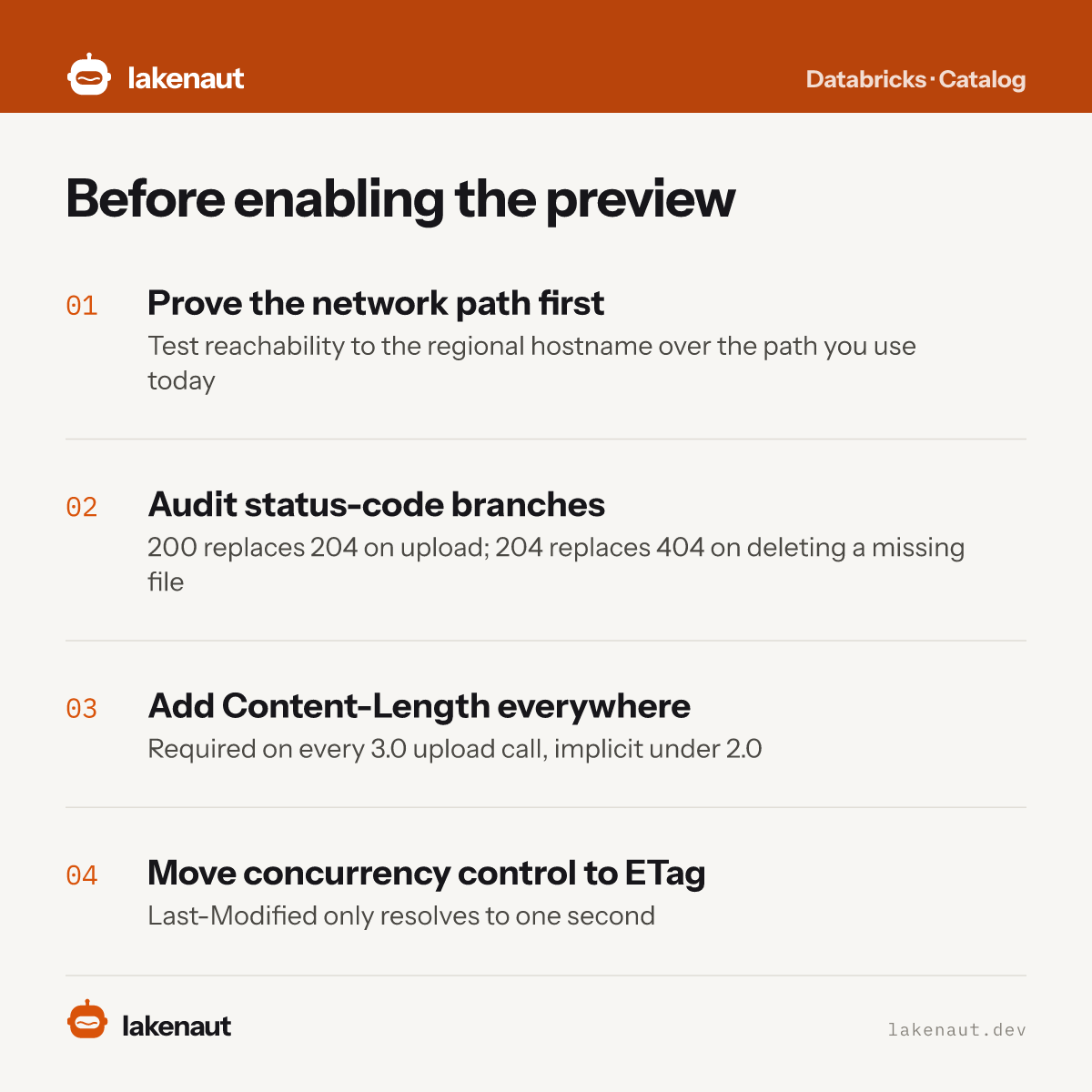
Before flipping the Previews toggle, the network path is the thing to prove first, not the code. A workspace’s ID and region are visible in the account console and in the deployment URL itself, and the regional hostname follows a fixed <workspace-id>.storage.<region>.<domain> pattern the how-to page gives directly — reachability to that exact host, over whichever path the workspace actually uses today, is a five-minute test that saves a surprised on-call rotation later. The same page flags that this traffic carries ordinary Databricks data transfer charges and that serverless network billing applies to it, which is worth knowing before a large backfill runs through multipart for the first time rather than after the bill arrives.
Once it’s running, treat 412 and 409 rates on writes as a signal worth watching, the way you’d watch retry rates on any store with optimistic concurrency: a sudden rise means something is racing to the same path more often than the design assumed, not that the API is misbehaving. And because Last-Modified only has one-second precision, don’t lean on it for anything that writes more than once a second to the same file — ETag with If-Match is the only validator in this API with the resolution to tell two recent versions apart.
Monday
Test reachability to the workspace’s regional hostname — <workspace-id>.storage.<region>.<domain> — over the network path currently in use, before turning on the preview. Audit any code that branches on 204 versus 200, or on 404 versus 204 for deletes, since both status codes change between 2.0 and 3.0. And for any writer that shares a path with another process, add If-Match with the file’s current ETag now — on 2.0 if the workload needs it sooner, on 3.0 once it’s available — rather than waiting for a lost update to make the case.
The concepts this stands on
Pages read for it
Get the changes that matter by email