Standard Is Now the Default for Job Compute — Here's When Dedicated Still Wins
Auto now resolves most new job compute to Standard; the workloads that truly need Dedicated are narrower than most policies assume.

A nightly job cluster runs an ETL step, then a step that trains a small model on the same data, then a step that writes predictions back to a governed table. Whoever built it picked compute once, for the whole job, and moved on. Until November 9, 2026, creating that job compute in the UI started with access mode set to Dedicated, so a lot of jobs ended up there by default rather than by decision. Now the UI starts on Auto, which mostly resolves to Standard — and the question that was invisible before is suddenly the one worth getting right: does this job actually need Dedicated, or did it just inherit it from a default nobody looked at?
What Auto actually picks
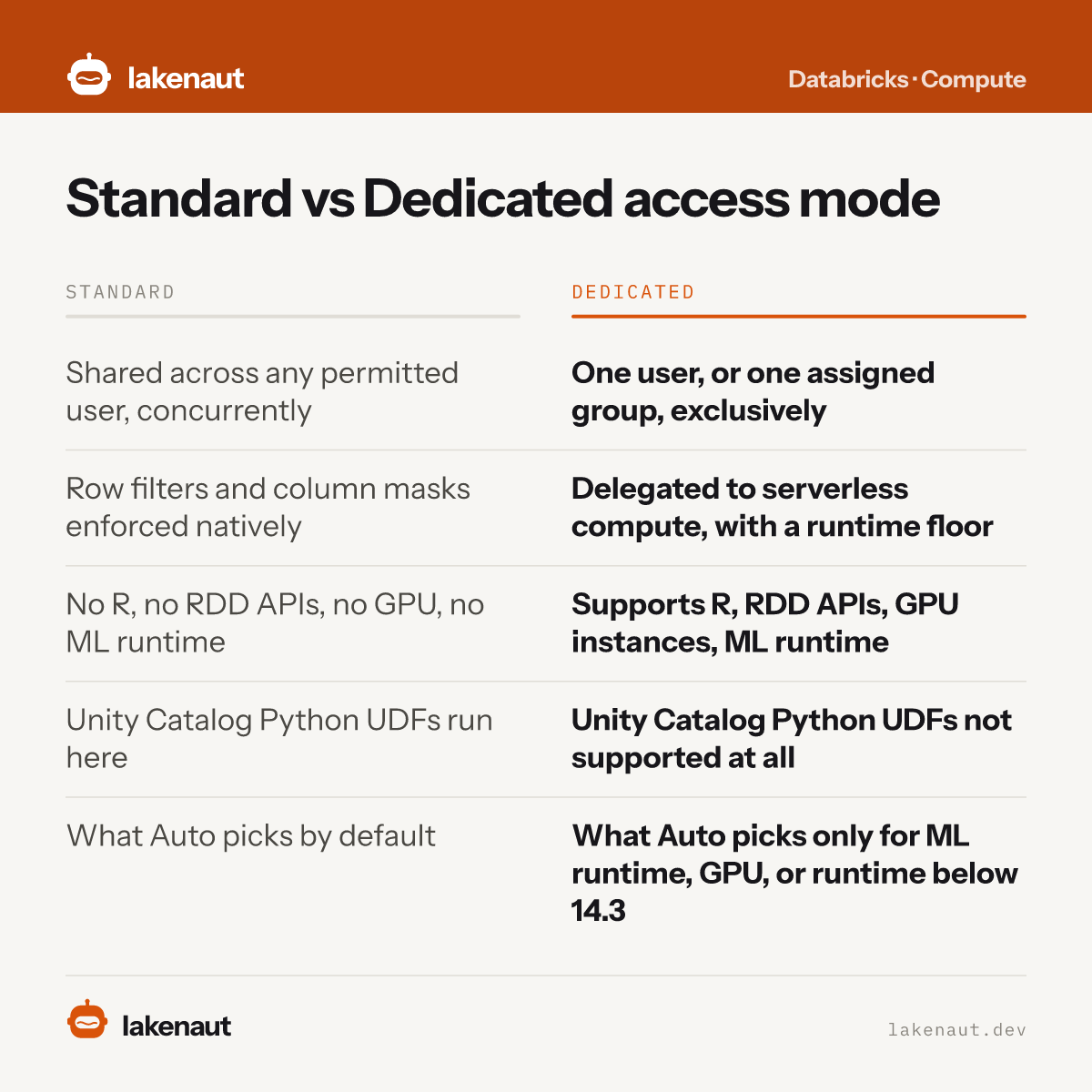
Access mode is the setting that decides who can attach to a compute resource and what they can reach through it — not how big it is or what it costs, which is a separate choice. There are two modes worth choosing deliberately. Standard is shared: any number of permitted users attach and run work concurrently, isolated from each other through Databricks Lakeguard, which keeps user code out of the Spark driver and sandboxes it instead of giving it privileged access to the machine. Dedicated is private: the resource belongs to one user or one group, and only they can use it.
Left on Auto, Databricks picks Standard unless you selected a machine learning runtime, a GPU instance type, or a Databricks Runtime below 14.3 — in which case it picks Dedicated for you. That’s the whole rule. It’s also the detail that makes Auto worth distrusting on a mixed job: pick an ML runtime for the training step in the example above, and the entire job cluster — including the ETL and the write-back steps — becomes Dedicated, whether or not anything else in that job wanted to be.
The decision that’s actually on the table
Framed as a recommendation rather than a rule, Databricks recommends standard compute for most workloads — general data engineering and ETL, collaborative data science, interactive exploration, anything where sharing one resource across multiple users is a cost win rather than a risk. Dedicated compute is recommended only for workloads that specifically need RDD APIs, GPU instances, R, or privileged access to the underlying machine. Read backwards, that’s the actual test: if your workload doesn’t need one of those four things, Standard is the right default, and Dedicated is a cost — not of money particularly, but of governance, because Dedicated hands back exactly the privileged machine access that Lakeguard exists to take away.
The asymmetry that trips people up is that Dedicated isn’t simply “more capable, with fewer restrictions.” It drops something Standard has: Unity Catalog Python UDFs aren’t supported on dedicated compute at all, in any runtime version. A team that reads “Dedicated” as the safe, unrestricted choice and defaults every job cluster to it will eventually hit a UDF that silently has nowhere to run.
What goes wrong once you stop thinking about it
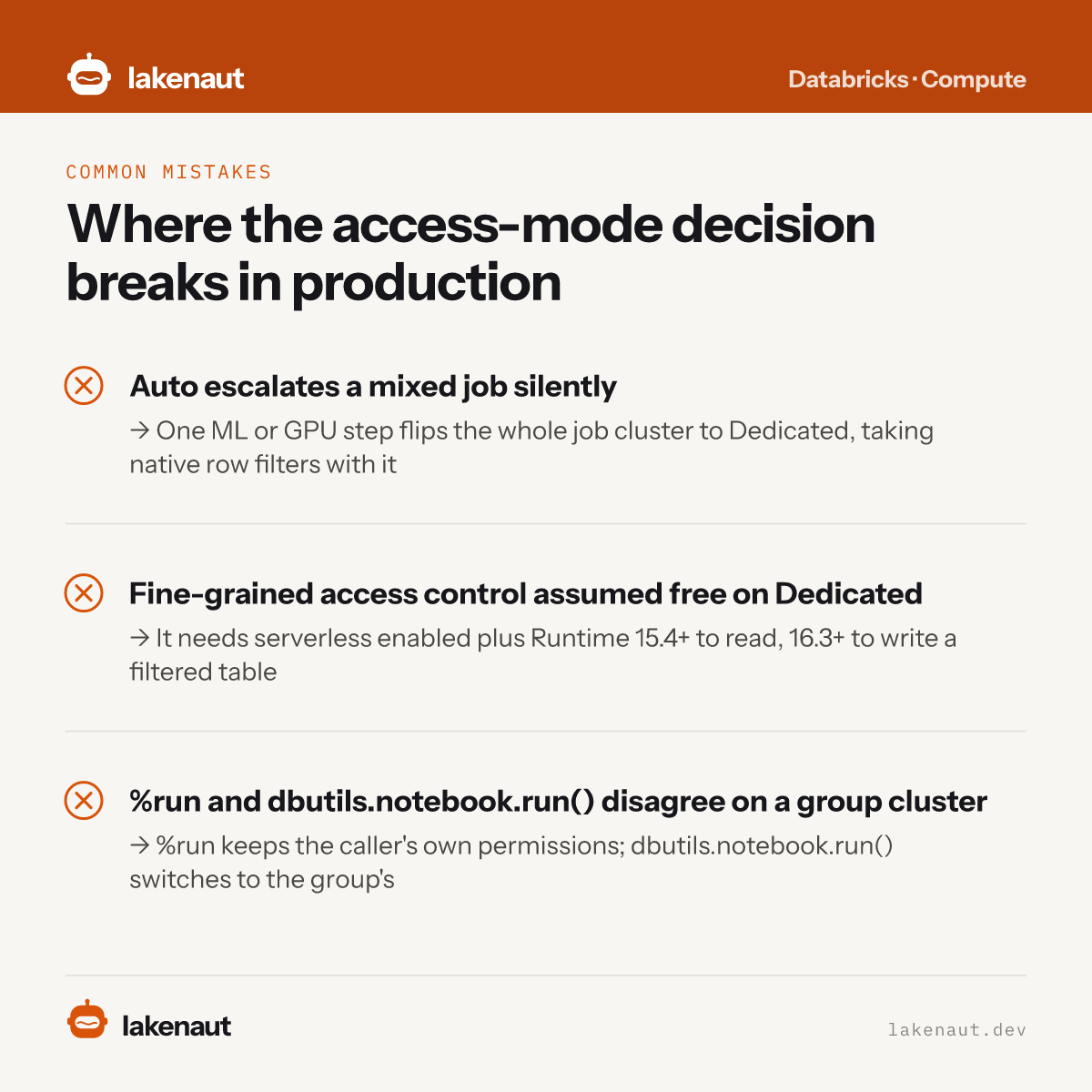
Auto quietly escalates a mixed job. The training step in a shared ETL-plus-ML job needing an ML runtime is a reasonable choice on its own. The side effect — the whole cluster becoming Dedicated, and the ETL steps in the same job losing native fine-grained access control along with it — is not something Auto tells you about. If a job’s steps have different real requirements, they belong on different job clusters inside the same job, each with its own access mode, rather than one cluster carrying the strictest requirement of any of its steps.
Fine-grained access control on Dedicated is a delegation, not a feature. Dedicated compute needs a serverless-enabled workspace, Databricks Runtime 15.4 LTS or above to read a table carrying a row filter or column mask, and 16.3 or above to write through one. Below that, on Databricks Runtime 15.3 or earlier, dedicated compute can’t read a filtered table or a dynamic view at all, and reading through any view requires SELECT on every table and view the view references — not just the view itself. None of that is a limitation Standard has, because Standard enforces row filters and column masks itself instead of handing the query to serverless compute behind the scenes.
Group clusters answer to two identities, and the notebook context doesn’t always pick the one you expect. Dedicated compute can be assigned to a group instead of a user — still Public Preview as of this piece — and when someone attaches to it, their permissions are replaced by the group’s for the session: anything they query, create, or write is governed and owned as the group, not as them. The Jobs API supports this directly: setting run_as.group_name on a job runs it with the group’s permissions, the same switch that happens interactively. The sharp edge is that not every piece of a notebook session makes that switch the same way — %run keeps the calling user’s own permissions, while dbutils.notebook.run() on the same cluster runs under the group’s, which is a quiet way for one notebook to produce two different answers to the same question depending on which command called it.
Jobs that check out Git on a group cluster fail outright, because the temporary directory the checkout needs isn’t writable under the group’s identity — the fix is to use Git folders instead of a Git-checkout task, not to debug the checkout itself.
Locking the decision instead of re-deciding it every time
Auto is a UI convenience, not a governance control — it has no opinion about whether your workspace wants Dedicated compute to exist at all. A compute policy that fixes data_security_mode removes the ambiguity for everyone who uses it, by taking the choice out of the create-compute screen entirely:
{
  "cluster_type": {
    "type": "fixed",
    "value": "job"
  },
  "data_security_mode": {
    "type": "fixed",
    "value": "USER_ISOLATION",
    "hidden": true
  },
  "spark_version": {
    "type": "unlimited",
    "defaultValue": "auto:latest-lts"
  },
  "custom_tags.team": {
    "type": "fixed",
    "value": "data-platform"
  }
}
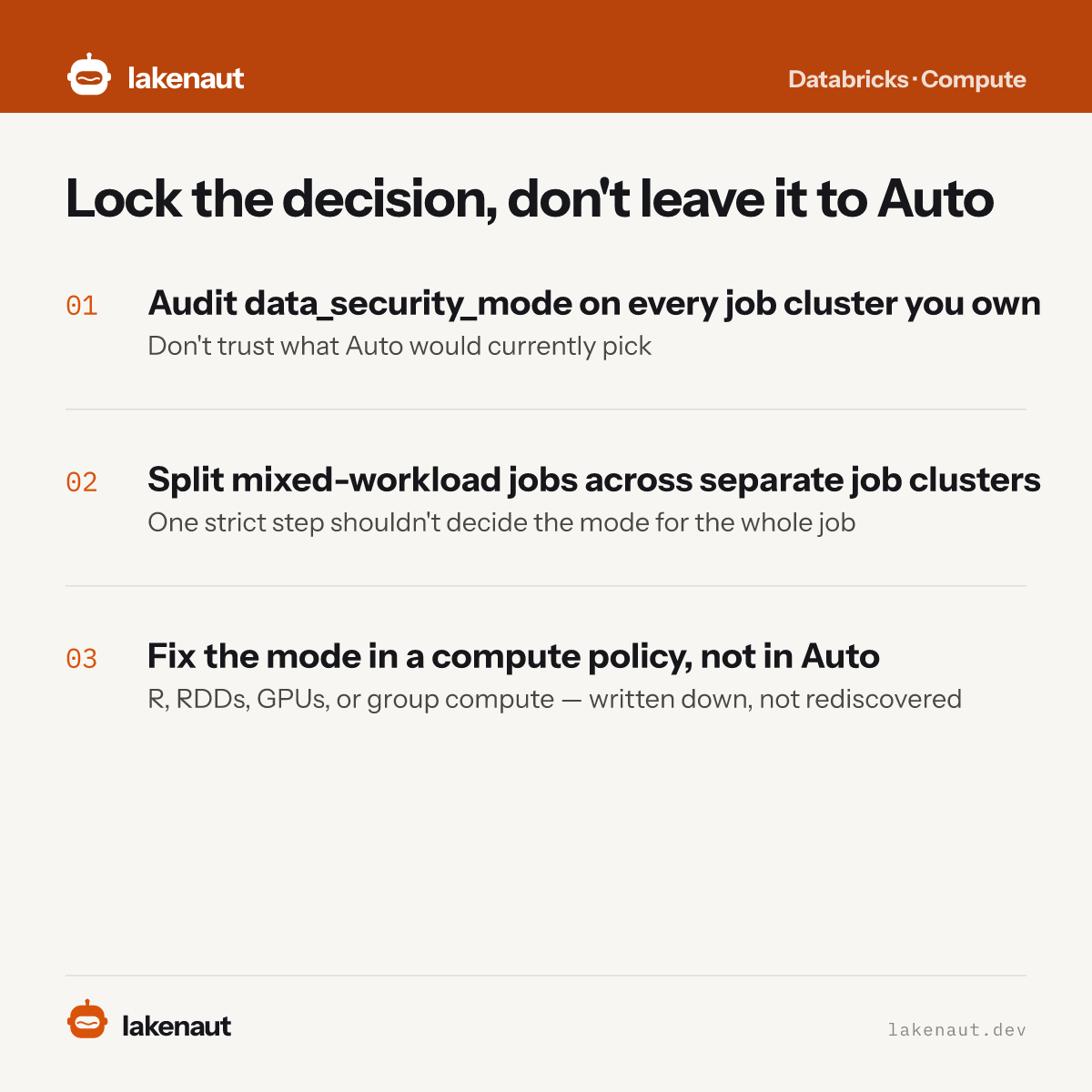
USER_ISOLATION is the access mode value behind what the UI now calls Standard; a separate policy fixed to SINGLE_USER is how you’d hand a team the Dedicated path deliberately, rather than letting Auto’s ML-runtime-or-GPU heuristic decide it for them. Because data_security_mode takes exactly one rule, a job-compute policy that fixes it this way makes the choice permanent for every job built on it — no Advanced section to forget, and no Auto to second-guess which runtime someone picked. This is the same mechanism behind any other locked-down compute policy: one attribute, one rule, applied before the cluster exists rather than audited after.
What to watch once it’s decided
The audit log is where a group-cluster mismatch between the two identities involved — who ran it and whose permissions actually did the work — becomes visible instead of theoretical:
SELECT
  user_identity.email        AS run_by,
  identity_metadata.run_as   AS run_as_identity,
  action_name,
  event_time
FROM system.access.audit
WHERE service_name = 'unityCatalog'
  AND identity_metadata.run_as IS NOT NULL
ORDER BY event_time DESC
LIMIT 200;
Run that after rolling out a group cluster and you can see, per action, whether run_by (who authenticated) and run_as (whose permissions were used) are the pairing you intended — useful the first time someone reports being able to see data they didn’t expect to, or not being able to see data they did.
Beyond the audit log, the plainer check is simpler: list the job clusters that are still Dedicated for no reason anyone remembers, and the ones still on Auto in a workspace that runs mixed workloads. The November 2026 default change doesn’t touch existing jobs, and workspaces with the compliance security profile don’t get the new Auto default until December 2026 — so for a while, the jobs most worth auditing are the ones nobody has touched since before the change, which are exactly the ones most likely to be on a mode they never chose.
For Monday
Pull the list of job compute definitions your team owns and check data_security_mode on each one explicitly, rather than trusting what Auto would currently pick. For any job that mixes an ETL or SQL step with an ML or GPU step, split it across separate job clusters inside the job instead of letting the strictest step’s requirement apply to all of them. And wherever Dedicated turns out to be the right call — R, RDDs, GPUs, or a genuine need for group-scoped compute — write that choice into a compute access mode policy instead of leaving it for the next person to rediscover by accident.
The concepts this stands on
Pages read for it
- docs.databricks.com/aws/en/compute/standard-overview
- docs.databricks.com/aws/en/compute/dedicated-overview
- docs.databricks.com/aws/en/compute/standard-limitations
- docs.databricks.com/aws/en/compute/dedicated-limitations
- docs.databricks.com/aws/en/admin/clusters/policy-definition
- docs.databricks.com/aws/en/compute/group-access
- docs.databricks.com/aws/en/release-notes/product/2026/november#new-jobs-compute-defaults-to-auto-access-mode
Get the changes that matter by email