Pipeline Flows Just Became Their Own Unity Catalog Securable — Here's Who That Actually Helps
A Beta release lets you grant and revoke access to a single flow inside a Lakeflow pipeline, not just the table it writes or the pipeline that runs it.

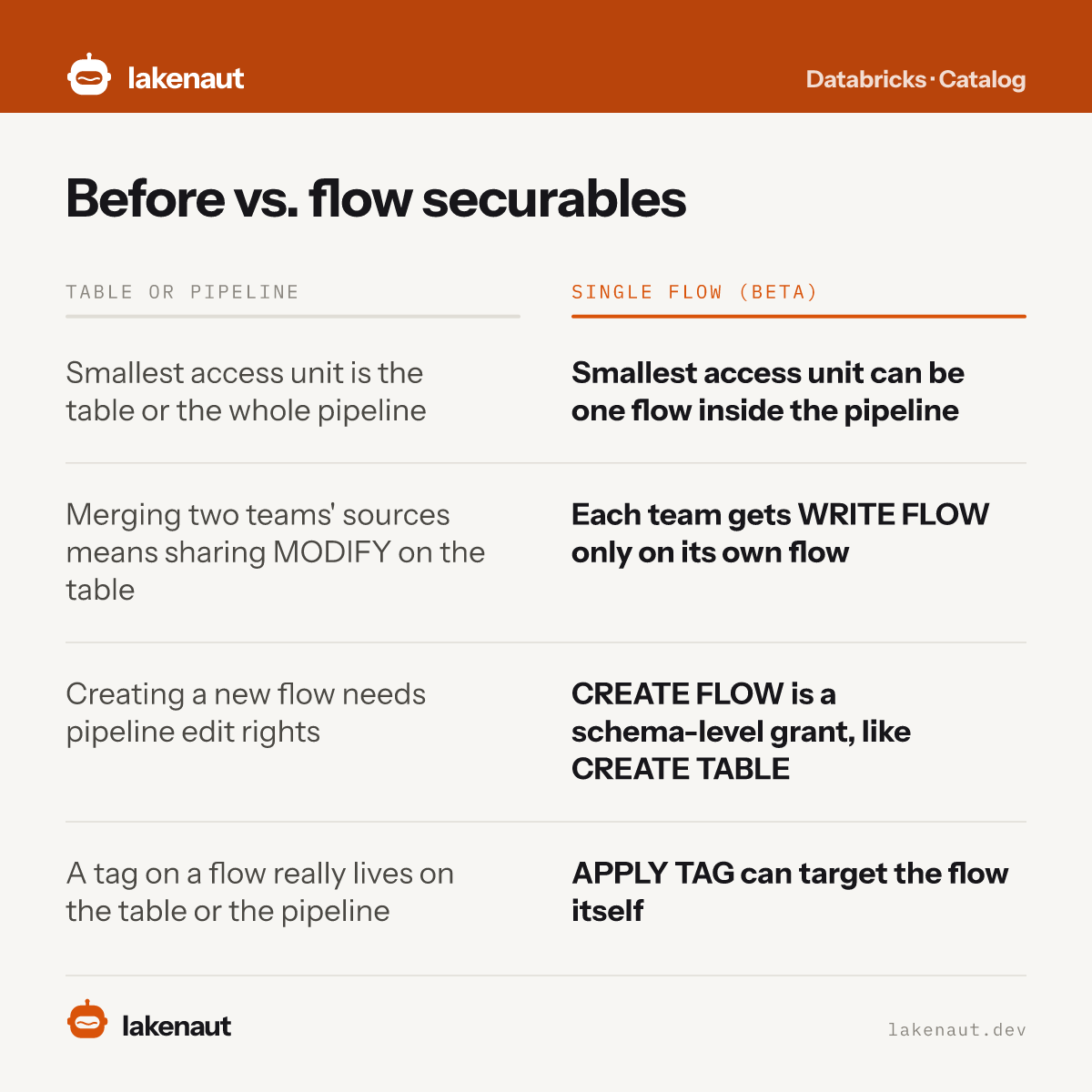
A pipeline that two teams depend on tends to end up with one of two shapes: either each team gets its own pipeline and a materialized view stitches the outputs together downstream, or everyone writes into the same pipeline because the data genuinely belongs together — order events from three regions landing in one streaming table, say, each region fed by its own flow. The second shape is the one the documentation actually recommends: a streaming table can have several flows appending into it, and that’s the documented way to merge multiple sources into one dataset. It’s also the shape where permissions have never had anywhere good to attach. You could grant on the table everyone writes to, which is wider than any one team’s job. You could grant MANAGE or run rights on the pipeline, which is wider still. There was no privilege that stopped at the one flow a team actually owns.
Databricks’ November 2026 release notes list a Beta that targets exactly that gap: flows inside a Lakeflow pipeline are now securable objects in Unity Catalog in their own right.
What actually changed
Five privileges now apply to an individual flow: READ FLOW, REFRESH FLOW, WRITE FLOW, APPLY TAG, and MANAGE. A sixth, CREATE FLOW, is granted on a schema rather than on the flow itself, the same way CREATE TABLE is granted on a schema before the table exists. That detail matters more than it looks: it means who is allowed to add a new flow to a pipeline is now a governance decision made at the schema level, separate from who can touch the flows that already exist.
This is a Beta, and the release note is explicit that it isn’t something you simply flip on: participating means contacting your Databricks account team. That’s a meaningfully different rollout from a Previews-page toggle, and it’s worth noticing — it means the feature can exist in the release notes for a while before it exists in your workspace, and two workspaces on the same account can legitimately be in different states.
Why a flow needed its own privilege
Unity Catalog’s privilege model, outside of this Beta, has a clean shape: everything is denied until there’s a GRANT, and grants flow down from catalog to schema to table. USE CATALOG and USE SCHEMA get you through the door, SELECT and MODIFY govern the data, and MANAGE governs who else can grant. None of that hierarchy had a rung for “the thing that writes rows from source A into this table, as opposed to the thing that writes rows from source B into the same table.” A flow sits below the table but isn’t the table — it’s the edge, not the node — and edges didn’t have privileges.
In practice, that pushed teams toward one of two workarounds. The cleaner one — separate tables per source, merged later by a view or a materialized view — costs you a join and a bit of staleness, but keeps permissions where they already work. The messier one is the shared pipeline above, where the actual control boundary ends up being “who do we trust to open this pipeline’s definition,” because that’s the only lever available. A contractor who should only ever touch one regional feed inherits visibility into the whole thing, or a platform team ends up as the de facto approver for every flow addition because CREATE FLOW wasn’t a thing you could delegate on its own.
Flow-level privileges close that specific gap without changing the rest of the model. The grant-only, deny-by-default rule still applies — there’s still no DENY in Unity Catalog outside the legacy metastore, so restricting a flow still means not granting it, or revoking what was granted, rather than issuing an explicit denial.
What goes wrong in production
The most predictable failure mode is the one the mistakes above spell out: granting MANAGE on the pipeline as a shortcut, the same way teams have long reached for ALL PRIVILEGES on a schema “to unblock” someone. MANAGE on the pipeline doesn’t stay scoped to the flow someone needed access to — it’s a pipeline-level grant, and the whole reason this Beta exists is that pipeline-level and flow-level are different boundaries now. Reach for the narrower privilege on purpose, or the new model buys you nothing.
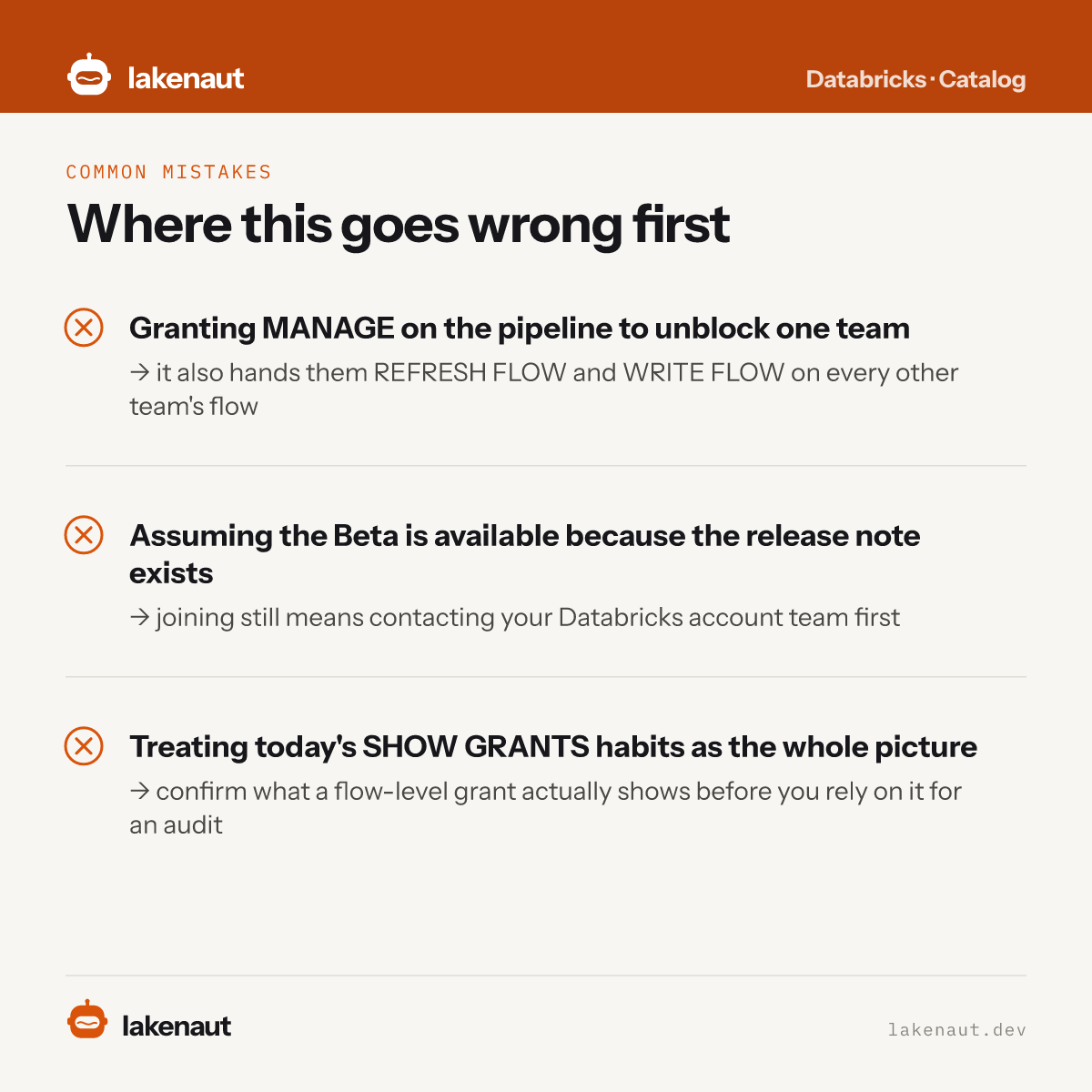
The second failure mode is organizational rather than technical: uneven access to the Beta itself. If one workspace has joined and another hasn’t, a runbook that says “grant REFRESH FLOW on the ingestion flow” is wrong advice for half your estate until the rollout catches up — and because joining goes through an account team conversation rather than a self-serve preview flag, you can’t always tell from inside the workspace whether you’re looking at a gap in your setup or a gap in your entitlement.
The third is an ownership problem that predates this feature but gets sharper with it: a flow, like any securable, has an owner, and the owner holds every privilege on it. If a flow is scoped tightly enough that only one engineer has MANAGE on it, that engineer leaving the team without a transfer leaves the flow orphaned in exactly the way an unowned table does today — except now it’s a flow nobody even remembers to look for, because flow-level permissions are new enough that most access reviews don’t check them yet.
How to operate it
The grant and revoke mechanics for flows follow the same shape Unity Catalog already uses everywhere else — the same GRANT ... TO and REVOKE ... FROM pattern you’d use on a table:
GRANT SELECT ON TABLE main.sales.orders_bronze TO `analysts`;
REVOKE SELECT ON TABLE main.sales.orders_bronze FROM `analysts`;
What’s new is only the object the privilege attaches to, not the verb. Before relying on it operationally, confirm three things in your own environment rather than assuming them: whether SHOW GRANTS on a flow shows the same explicit-grants-only view it shows on a table, whether a flow’s owner defaults to whoever owns the pipeline or whoever defined that specific flow, and whether CREATE FLOW on a schema is something your existing schema-owner groups already hold without you noticing — since it’s granted the same way CREATE TABLE is, anyone who can create tables in a schema today may be able to create flows in it the moment the Beta lands.
Treat the pipeline’s event log the way you already do for anything else inside a shared pipeline: flow_definition events are your record of what flows exist and how they’re wired, which is the natural place to check that a new flow — and the grant that let someone create it — actually matches what you expected.
Audit your shared pipelines before you ask to join the Beta, not after. Find the ones where more than one team’s data feeds the same streaming table through separate flows — that’s the pattern this actually fixes, and it’s also the pattern where today’s access control is weakest. For each one, write down who currently has pipeline-level MANAGE versus who should really only ever touch their own flow, so that the conversation with your account team starts from a specific pipeline and a specific access gap rather than a general request. And until the Beta is confirmed in your workspace, don’t let a runbook imply flow-level control that isn’t there yet; keep the table-or-separate-pipeline workaround as the documented interim state, not an unstated assumption.
The concepts this stands on
Pages read for it
Get the changes that matter by email