Managed or External Tables? Catalog Commits Just Moved the Line
External access was the best argument for external tables. Catalog commits are closing it, and the real decision now turns on format and control.

Somewhere in most lakehouses there is a schema full of external tables nobody quite remembers the reason for. Ask around and the explanation is usually one of two things: either the data arrived as Parquet or JSON from a system Unity Catalog cannot manage directly, or some tool outside Databricks — a federation layer, a partner pipeline, a BI engine — needed to read the files straight out of the bucket. For years, external was the only way to get that second kind of access. Databricks has now put dates on two changes that take a real bite out of that reason, which makes this a good moment to re-run the decision instead of leaving tables external out of habit.
The split as it has stood
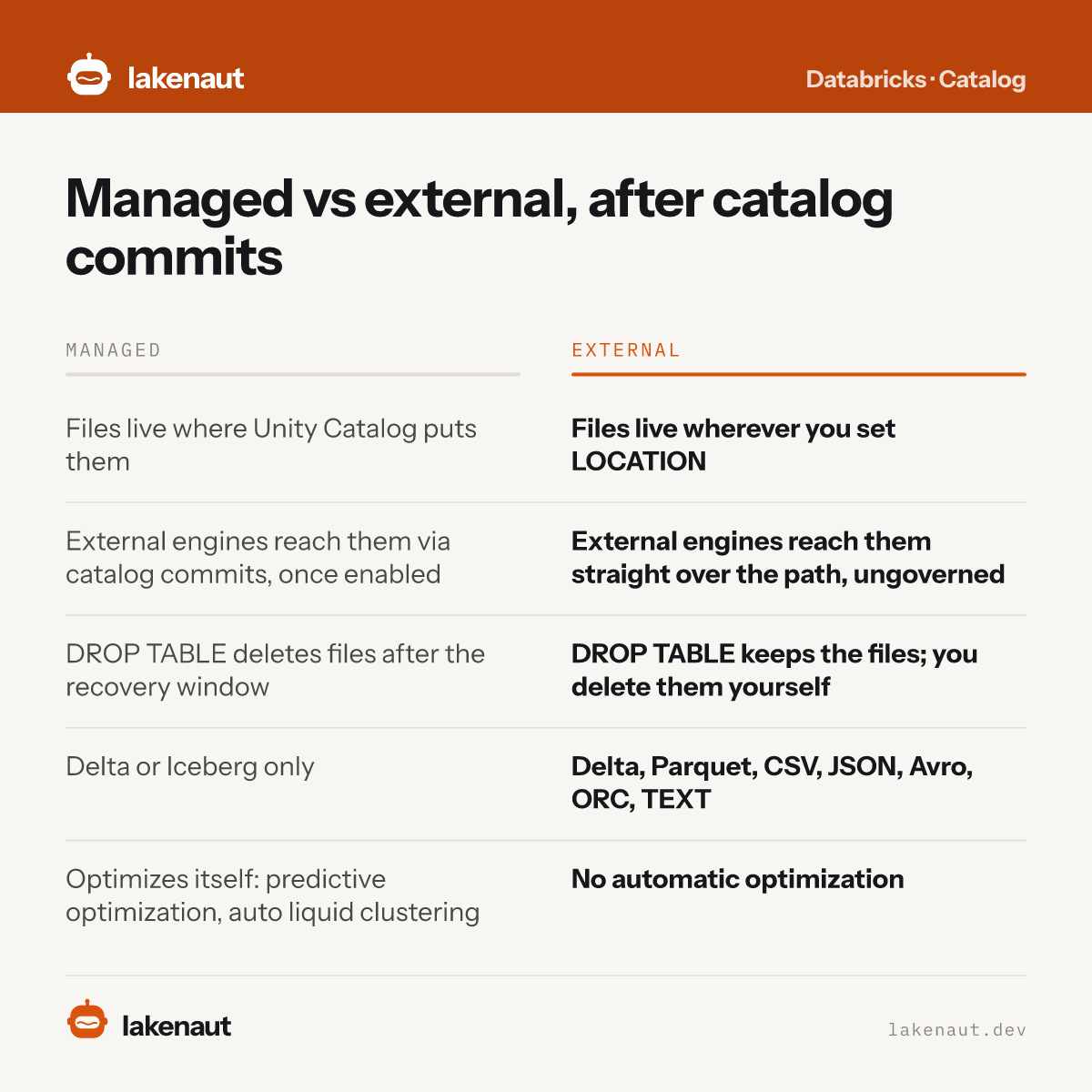
A table in Unity Catalog always has two parts: the metadata that Unity Catalog governs either way, and the data files. The only question managed and external tables answer is who controls those files.
A managed table has no LOCATION; its files sit in the managed location of the schema, catalog, or metastore, and Unity Catalog owns their lifecycle. An external table is created with a LOCATION inside a registered external location, and the files stay exactly where you put them:
-- managed: no LOCATION, Unity Catalog owns the files
CREATE TABLE prod.sales.orders (
  id BIGINT, amount DECIMAL(10,2), order_date DATE
);

-- external: files stay at the path you chose
CREATE TABLE prod.sales.orders_ext (
  id BIGINT, amount DECIMAL(10,2), order_date DATE
)
LOCATION 's3://acme-prod-data/sales/orders/';
Databricks’ own recommendation has been consistent: default to managed, because it costs less to store and query, and optimizes itself automatically with predictive optimization and automatic liquid clustering. External is for two situations: data that already exists in a format Unity Catalog cannot manage — JSON, Avro, CSV, ORC, plain Parquet — and giving non-Databricks clients direct access to the files, because Unity Catalog privileges are not enforced on that path.
That second reason is the one worth questioning now.
What catalog commits actually change
Managed tables already expose read and write access to external engines — Trino, DuckDB, Iceberg REST Catalog-integrated tools — through the Unity REST API and the Iceberg REST Catalog, with credential vending to scope the access to the requesting principal. What changes is that writes from those external engines now require catalog commits: a mode where Unity Catalog itself coordinates commits to the table. Catalog commits are what make multi-statement, multi-table transactions, enforceable schema and constraint changes, and safe concurrent writes from outside Databricks possible at all. They are off by default today, except that automatic upgrades can already turn them on for new tables created in new schemas; you can also turn them on deliberately with the delta.feature.catalogManaged table property.
Databricks has now scheduled two changes that push this from an opt-in feature toward a baseline expectation. After Databricks Runtime 15.4 LTS reaches end of support on 19 August 2027, every Unity Catalog managed table will be upgraded to catalog commits — this is not a preview you can skip, it is the planned default end state for managed tables. Separately, starting on or after 10 December 2026, workspaces with the compliance security profile enabled will get external access to Unity Catalog managed Delta tables turned on by default: supported external Delta clients will be able to create, read, and write managed Delta tables, with creating and writing requiring catalog commits, and access still governed by the metastore’s external data access settings and by Unity Catalog privileges.
Put together, the argument for choosing external specifically because “something outside Databricks needs to touch this table” is getting weaker on a published timeline, not just in theory.
What’s genuinely still left for external
Two reasons for external tables survive this change untouched.
The first is format. Managed tables are Delta or Iceberg only. If a vendor or a connector writes Avro, CSV, JSON, ORC, or plain Parquet, there is no managed equivalent — you register it as external, full stop, until you decide to materialize it as Delta downstream.
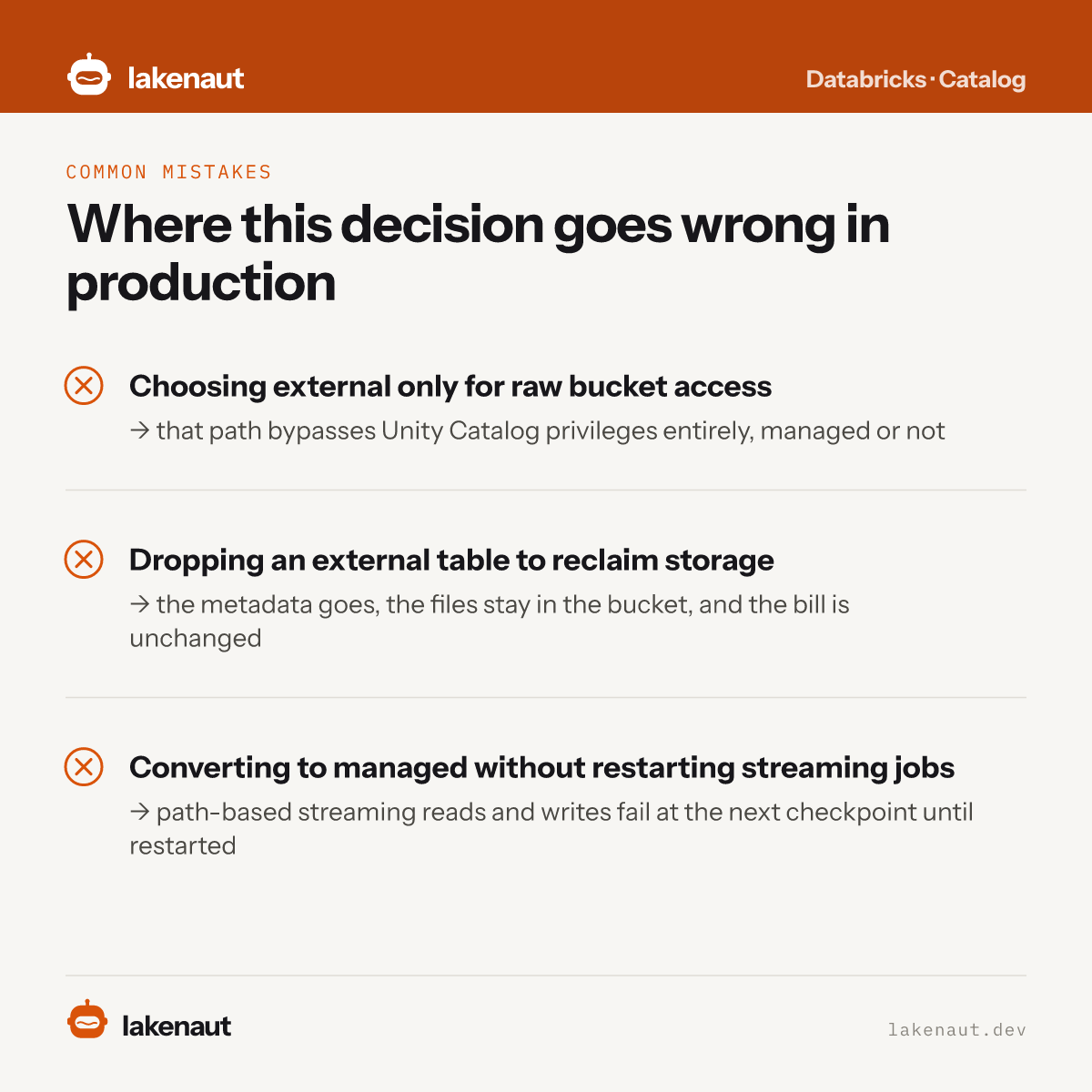
The second is raw, ungoverned path access. If a client reads s3://bucket/path directly rather than through the Unity REST API or the Iceberg REST Catalog, Unity Catalog privileges simply do not apply to that read, on an external table or — if someone tries it — on a managed one. Databricks is explicit that path-based access to managed tables is not supported, because it bypasses access controls and can corrupt data depending on the runtime or client version; the supported substitute is Compatibility Mode, a read-only governed copy. In other words, “external tables let a tool hit the bucket directly” was never really a governance feature. It is a cost that happened to come bundled with a type of table, and catalog commits do not remove it — they just give you a governed alternative for the cases that actually needed cross-engine access rather than a backdoor.
What breaks when you convert
Moving an existing external Delta table to managed no longer means a rewrite. ALTER TABLE ... SET MANAGED keeps the name, permissions, views, and history, and runs in two phases: an initial copy of the data and transaction log with no downtime, followed by a short switch where writes pause while the metadata updates to point at the managed location. Databricks’ own estimates for that second phase are a couple of minutes regardless of size — roughly 1–2 minutes of writer downtime for a 100 GB table on a 32-core warehouse, about the same for 1 TB on a 64-core warehouse, and up to 5 minutes for 10 TB on a 256-core warehouse, with the data-copy phase itself scaling from a few minutes to around 90 minutes.
The prerequisites are specific: the table must already be Delta, you need Databricks Runtime 17.3 LTS or serverless compute, and you need OWNER or MANAGE on the table. Two things fail quietly if you skip them. Streaming jobs reading or writing the table stop being valid at the switch and must be restarted — Databricks Runtime 18.1 and above redirects old path-based reads automatically, but writes only get that redirect from 18.2, and every redirect carries a latency cost, so the honest fix is to move code onto the table name rather than lean on the redirect. And if the table is shared through OpenSharing to another Databricks recipient, conversion does not update the recipient’s managed location on its own; you have to ALTER SHARE ... REMOVE TABLE and re-add it WITH HISTORY to reshare.
-- convert an external Delta table with no Iceberg reads enabled
ALTER TABLE prod.sales.orders_ext SET MANAGED;

-- roll back within 14 days if something is wrong
ALTER TABLE prod.sales.orders_ext UNSET MANAGED;
The rollback window is 14 days, during which the original files in the external location are kept; after that, with predictive optimization on, Databricks deletes them to reclaim storage.
Operating the decision
Two habits make this decision easier to keep straight once you have made it. First, do not assume DROP TABLE behaves the same way on both types. On a managed table, files are deleted once the recovery period expires — 7 days by default, configurable from 0 hours up to 30 days with ALTER CATALOG ... RETAIN DROPPED TO, a Public Preview setting you can push higher on a catalog that matters or lower on an ETL staging schema that creates and drops tables constantly:
ALTER CATALOG prod RETAIN DROPPED TO 30 DAYS;
UNDROP TABLE prod.sales.orders;
On an external table, DROP TABLE only ever removes the metadata; the files, and the bill for them, stay until someone deletes them from the bucket by hand.
Second, before converting anything, find out who is actually reading your external tables and how. Databricks’ Access Insights dashboard reports whether the readers and writers hitting a table are Databricks Runtime or external, non-Databricks clients. For external tables kept “just in case” an outside tool needs the files, that dashboard tells you whether anyone still does, and whether they go through the open APIs — which would survive a conversion to managed — or hit the path directly, which would not. For a quick inventory across a catalog, system.information_schema.tables gives you the type without touching every table by hand:
SELECT table_catalog, table_schema, table_name, table_type
FROM system.information_schema.tables
WHERE table_catalog = 'prod' AND table_type = 'EXTERNAL';
What to do with that list on Monday: split it by format first — anything that is not already Delta cannot convert and stays external by necessity. For the Delta ones, check Access Insights before touching anything; a table with real external-engine traffic over the open APIs is worth testing a SET MANAGED conversion against, now that catalog commits make the managed path do the same job with Unity Catalog’s privileges and optimization along with it. Put 10 December 2026 and 19 August 2027 on your own calendar, and if your organization has an external Delta client that writes to Databricks tables at all, test it against a managed table under catalog commits before that default flips under you.
The concepts this stands on
Pages read for it
- docs.databricks.com/aws/en/tables/managed
- docs.databricks.com/aws/en/tables/external
- docs.databricks.com/aws/en/tables/convert-to-managed
- docs.databricks.com/aws/en/release-notes/whats-coming#all-unity-catalog-managed-tables-will-be-upgraded-to-catalog-commits
- docs.databricks.com/aws/en/release-notes/whats-coming#external-access-to-unity-catalog-managed-delta-tables-will-soon-be-available-by-default-for-workspaces-with-the-compliance-security-profile-enabled
Get the changes that matter by email